

Launch the correct game
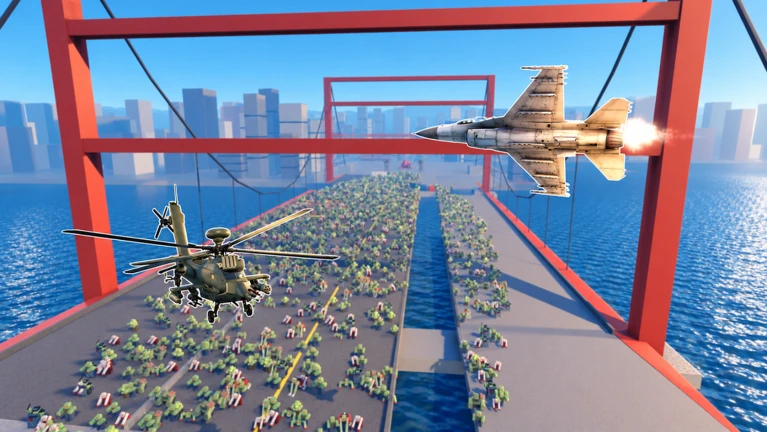
Zombie Air Force is the cooperative Roblox PvE shooter by fresh green beans. Your squad fights zombie hordes from the air, using rockets, chain guns, air strikes and deployed defenses. The official play button above opens place 73810139314608. Check that number and the creator when a search result leads to a similarly named experience.
The developer labels this version Alpha and warns that progression is being tuned. The official description advertises more than 180 upgrades, but a long upgrade list does not tell you which purchase fits your current aircraft. Start with the controls and the options visible in your own session.
Nisu links to the Roblox experience; the game does not run on this page. This guide uses the developer’s listing and October 10 player footage. We have not played the game ourselves.
Read the flight controls before your first attack
CHALLS’s October 10 recording shows a helicopter fighting above a street. At about 5:33, its control overlay lists the bindings below. Use these as a reference for that recorded PC interface, then compare them with your current on-screen prompts. They do not establish touch controls or the controls for every aircraft.
The same view separates HULL, BOOST, SPEED and ALTITUDE around the aiming area. Those labels help you tell damage from movement: a low hull reading is a different problem from low altitude. Look at the ground battle as well as your crosshair; the display also tracks the section, allies and FOB integrity.
| Recorded PC input | Label visible in the footage |
|---|---|
| Left mouse / right mouse | Fire / zoom |
| E / Q | Up / down |
| Hold Shift | Boost |
| 1 / 2 / 3 | Swap gun / swap support / swap defense |
| Mouse wheel | View |
| Hold Alt | Free mouse |
| Hold R | Return to base |
Player footage: the street battle around 3:03 and the control overlay around 5:33 show how the air and ground views fit together. Compare this Alpha recording with your current interface.
Treat defenses as part of the fight
The official description pairs air attacks with defenses that help allies hold the line. That gives a new squad two jobs to watch: attacking the horde and supporting the position below. In CHALLS’s footage around 0:33, ground emplacements are visible beneath the helicopter while the battle continues.
Before following a build recommendation, check which slot it refers to. The recorded interface separates gun, support and defense, so a suggestion about a defensive emplacement is not automatically a replacement for your main gun. Read the item’s current description and requirements before committing Credits.
For a first session, pick one threat to the position below and check which response you have available. After using it, watch what happens to that threat and the position. We have not tested a fastest-clear strategy.
Find Income before copying a money build
Under Ricoko Tutorial & Showcase’s beginner video, @ChesterAniciete asks how to upgrade income. In the reply, @Wake_Maker points to an Income option or stack-of-cash icon at the bottom right. If you have been looking only through weapon upgrades, inspect that area of your current interface too.
@Wake_Maker says Income upgrades reduce the kills needed to earn Credits and increase rewards from bounties and stage clears. Read the current upgrade description before buying: we have not independently checked that explanation, the price or how quickly an upgrade pays for itself.
The same discussion shows why an upgrade recommendation needs context. @Wake_Maker recommends rockets and reload upgrades, while the video creator explains that gun upgrades are cheaper for beginners. These are different priorities at different stages, not evidence of one best build. Compare what you can afford now with the requirement for the next upgrade you actually want.
Ricoko’s video is dated October 10. Around 1:43, it shows the helicopter, chain-gun indicator and battle HUD. Use the recording to recognize the interface; its title’s promise of fast Credits is the creator’s claim, not a measured earning rate from Nisu.
Player recording and discussion about starter upgrades. The guide references the visible flight HUD around 1:43; earnings and build preferences remain creator/player advice.
Check bonuses in the official listing
On October 12, the developer’s description listed THANKYOU and SORRY for a free bonus through the shop in new servers. Enter a code without quotation marks and follow the shop’s response. These are developer-listed codes, not rewards we redeemed; the listing does not specify an amount.
The description also advertises a group bonus, a friend-invite buff and a weekend buff. Read the current listing before planning around them. A screenshot with several icons active does not prove how those bonuses stack or how much a fresh account will earn.
If a code fails, check the spelling and the developer’s current notice, including its new-server condition. Return to the Roblox listing linked above for the latest announcement.
Quick help
Where is the Income upgrade?
A reply to @ChesterAniciete below Ricoko’s video points to the bottom-right Income option or cash-stack icon. Check that area and read the current description. This is attributed player guidance; the exact cost and benefit have not been independently tested.
Should a beginner upgrade guns or rockets first?
The discussion below Ricoko’s video favors different choices: the creator calls gun upgrades cheaper for beginners, while another player recommends rockets later. Compare the current prices and requirements with your Credits. This guide does not establish an optimal purchase order.
Which Zombie Air Force codes does the developer list?
The official Roblox description checked on October 12, 2026 lists THANKYOU and SORRY for a shop bonus in new servers. We verified the announcement, not successful redemption or reward amounts. Check the listing again if either code fails.
Where can I check the current Little Bird and jet prices?
Check the aircraft listings in your current game session. @EddieNelly59 asks about both prices below CHALLS’s video because the text is blurry; we could not establish either price from that footage. Alpha prices and availability may change.
Source and scope
This independent guide draws on Open Zombie Air Force on Roblox, checked on Oct 12, 2026. Published requirements and rules come from the linked sources; practice routines and examples are Nisu editorial suggestions.