

Find the right Roblox experience
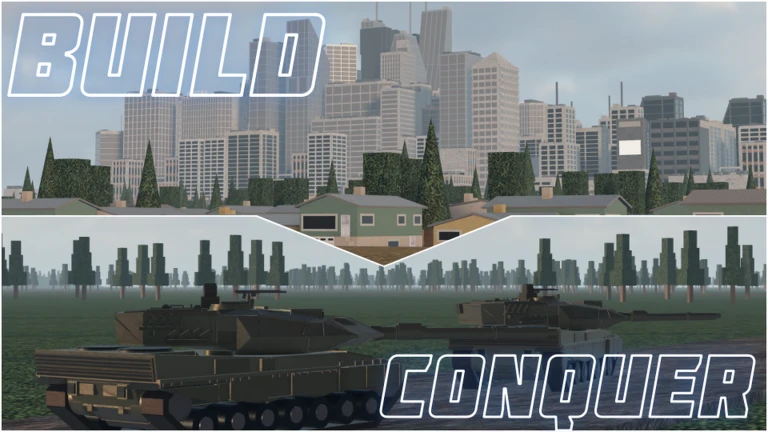
Build and Conquer is a Roblox strategy game by The Slop Company. You begin on an empty plot, develop a country and eventually take part in wars over strategic areas. Open place 103767961452227 using the Roblox button above. The listing currently calls it Build and Conquer [V0.1]. Check the creator and place ID if you arrive through another search result.
The developer describes the game as beta software with frequent updates. Before following an older guide, compare its building menu with the one in your session. Prices, requirements and the order in which options become useful can change. The official listing is the starting point for identifying the game; the player videos below help you recognize its interface.
Nisu does not host the game. The play link takes you to Roblox, where you launch the experience. We checked the public listing and player footage for this guide; we have not played the game ourselves.
Get your first settlement working
The official description lists neighbourhoods, roads, farms, shops, factories, power plants and water networks. Those categories give you a useful way to read the building menu: places for people, places that produce things, and infrastructure that supports the settlement.
IIlias_speeddyyy’s September 27 video gives a concrete example of where to look. Around 0:08, its caption directs viewers to open the build menu, go to Services and Water, and place a water tower. Around 0:23, the visible Services → Energy menu lists Solar Panel, Wind Turbine, Substation, Coal Power Plant and Nuclear Power Plant. Use those labels to find the relevant building information in your session.
In the comments, @ItsKaizenYT asks for help earning money from scratch. The clip offers one starting point: around 0:43, the creator says population has increased and free workers are available, then suggests placing a shop for jobs and income. The footage shows Shop selected in the Commercial menu, with a placement preview near a road. Compare the selected building’s requirements with your own workers and resources before buying; the video does not establish a fastest money-making method.
These are examples from the creator’s recorded session. We have not tested this as an optimal opening, and the beta may have changed since September. Learn one building at a time, using the current description and your own balance rather than copying the figures in the video.
Player footage sampled around 0:08, 0:23 and 0:43: water-tower instructions, the Energy menu and a Shop placement preview. September footage; check current requirements.
Read the city before adding more buildings
The developer lists money, workers, population, resources, happiness, power, research and production among the systems you manage. Keep those categories separate when something stops progressing. An available cash balance does not, by itself, tell you whether the rest of a building’s requirements are met.
For example, if you want to expand a neighbourhood, inspect the proposed building and your current city information first. If the game reports a missing requirement, solve that specific problem and check again. Buying unrelated buildings makes it harder to tell which change helped. Use the checklist below to decide which information to read next.
| What you are planning | What to inspect first |
|---|---|
| A larger settlement | Population, workers and happiness, alongside the selected building’s requirements. |
| More production | The farm, shop or factory description and the resources shown in your session. |
| New infrastructure | Your roads, power and water systems; read the relevant building information. |
| A research or military project | Its displayed requirements and the resources you will still need for the city. |
Watch the housing and research menus
Fundo’s October 7 guide demonstrates beginner menus in an already developed city. Around 0:23, the Medium Research Office window shows a research tree, with Requirements and What it unlocks beside the selected project. Pause there to see where the game explains a research choice before you commit resources in your own session.
Around 1:43, the creator opens Housing → Apartments and displays building information. Compare the listed benefits and needs with your own city before placing anything. This makes the video useful as a menu reference; it does not show a fresh plot growing into that completed city. Use the current in-game information if costs or requirements have changed since the recording.
Menus demonstrated in an already developed city: Medium Research Office around 0:23 and Housing → Apartments around 1:43. Use them to locate information, not to copy the city’s figures.
Connect research to your military plan
The official description connects technology research with manufacturing vehicles and missiles. It also describes deploying troops through tunnels to the mainland, forming alliances, defending cities and fighting other nations over strategic areas. That is the broader loop your settlement feeds into.
Before committing to a military project, choose a concrete goal: learn how deployment works, prepare to defend your city, or coordinate with another player. Then inspect the relevant research, manufacturing and deployment options. Keep the city’s needs in view while you work toward that goal.
Tunnels are the developer-described route for deploying troops to the mainland. In the short video’s comments, @graviteaa reports seeing “stop too far from tunnel” when trying to deploy troops and vehicles. @Ilias_Kareem17 replies that the road needs to connect to the tunnel. That gives you one connection to inspect if you see the same message. It is a single player’s suggestion, which we have not tested, so it may not resolve every deployment problem.
Choose your next step
For your first session, aim to understand one expansion decision and one requirement you had to satisfy. Once you can explain what you placed and why, inspect the next research or military option that interests you. You can return to the videos for the interface without treating another player’s run as the only route.
If you want another conquest game afterward, the related RoFront guide introduces a different Roblox territory-control experience. Tiny Tribes covers a separate resource-and-discovery loop. Share this page when you want a friend to join the exact Roblox experience linked above.
Quick help
Which Build and Conquer game does this guide cover?
The Roblox experience by The Slop Company, place 103767961452227, listed as Build and Conquer [V0.1]. Check the creator and place ID when a search result points to a similarly named game.
How can I start earning money in Build and Conquer?
Around 0:43 in IIlias_speeddyyy’s starter video, the creator suggests placing a shop once free workers are available, describing it as a source of jobs and income. Check Shop in the Commercial menu and read its current requirements. This is one recorded example, not a verified fastest method or a promise of a particular income.
What can I check if deployment says “stop too far from tunnel”?
The official description says troops deploy through tunnels to the mainland. In reply to @graviteaa’s report of this message, @Ilias_Kareem17 suggests connecting the road to the tunnel. Inspect that connection and the current deployment requirements. We have not tested the reply’s suggestion, and it is not a guaranteed fix.
Source and scope
This independent guide draws on Open Build and Conquer on Roblox, checked on Oct 12, 2026. Published requirements and rules come from the linked sources; practice routines and examples are Nisu editorial suggestions.