

Choose a route: direct DLL or NeoModLoader
Worldfall is an unofficial WorldBox mod by Second Hr. It renders the living map in 3D and lets you take a creature’s point of view. You still launch WorldBox. The mod’s beta download is free; the author says Ko-fi donations are optional. You need the base game separately.
For a simple desktop setup, the author provides a direct Worldfall.dll download. For the Workshop edition, install NeoModLoader (NML) first. Those are alternative ways to load Worldfall. Installing both copies can make you run a different build from the one you intended.
This guide was checked on October 19, 2026 against the author’s install page, release notes and distribution listings. It is a documentation guide, not a Nisu playtest. The diagrams below show file placement; they do not reproduce a Steam or Finder screenshot.
| Your setup | Route to follow | How to check it loaded |
|---|---|---|
| Windows, simple manual install | Worldfall.dll in StreamingAssets/mods | F1 controls or F2 Worldfall settings |
| Apple Silicon Mac | Author recommends the NML edition | NML list, then F1 or F2 |
| Steam Workshop edition | Install NML by hand once; subscribe to Worldfall | Worldfall in NeoModLoader’s list |
| Already using NML | Keep one Worldfall copy on the NML route | Check for an old standalone DLL |
| Android | Separate early package and Android NML | Limited device testing; desktop steps do not apply |
Windows: put the DLL inside StreamingAssets
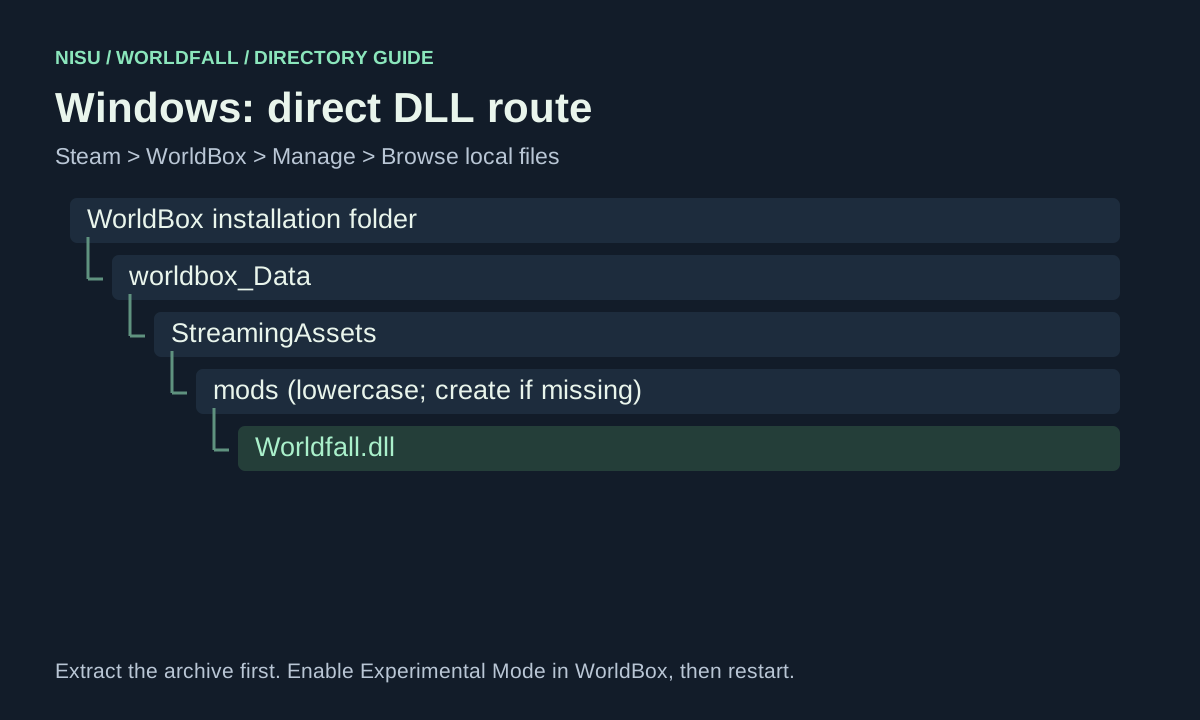
Close WorldBox before moving files. In Steam, right-click WorldBox, choose Manage, then Browse local files. Open worldbox_Data, then StreamingAssets, then the lowercase mods folder. Create mods if it is missing.
Extract the author’s Worldfall.zip and place Worldfall.dll directly in that mods folder. The final path ends in worldbox_Data/StreamingAssets/mods/Worldfall.dll. A ZIP sitting unopened in the game directory is not the direct DLL installation.
Launch WorldBox, enable Experimental Mode in Settings, and restart the game. To check the result, try F1 and F2, or select a creature and press G. The direct build does not need an NML list entry to prove it is active.
Mac: open the app package before looking for mods
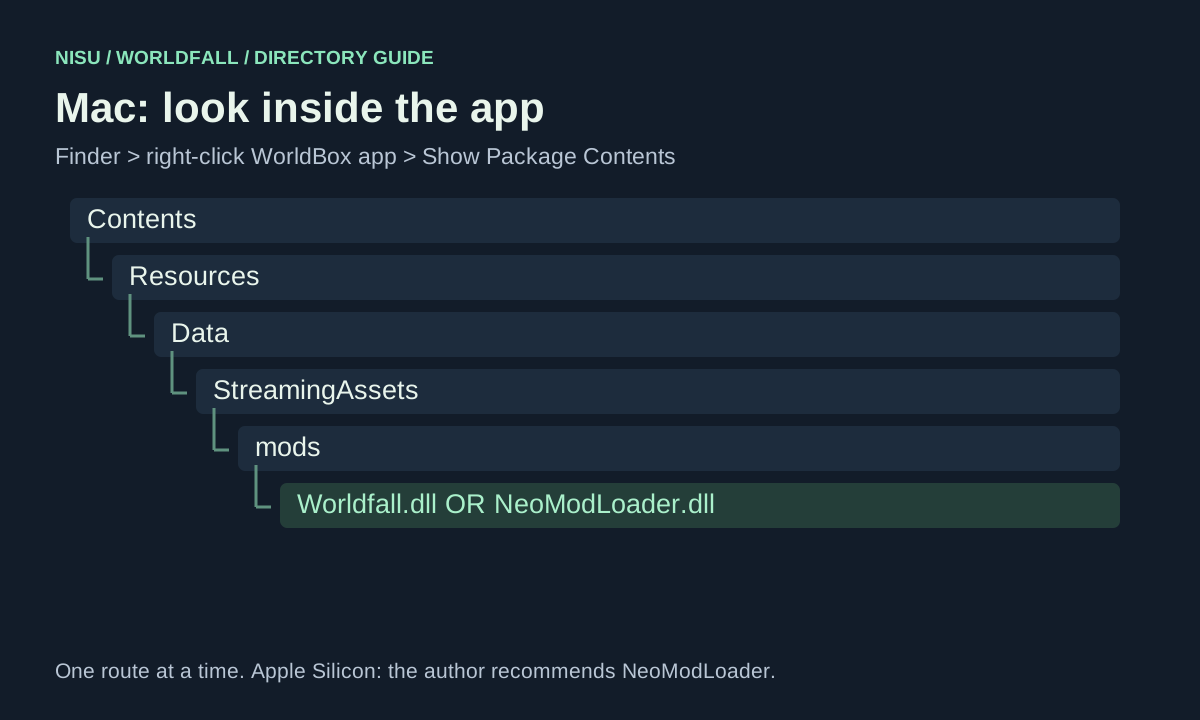
Use Steam’s Manage, Browse local files entry to find the installed WorldBox app. In Finder, right-click the app and select Show Package Contents. Open Contents, Resources, Data, StreamingAssets, then mods. Create that last folder if necessary.
The direct route places Worldfall.dll inside Contents/Resources/Data/StreamingAssets/mods. Start WorldBox, enable Experimental Mode and restart. On an Apple Silicon Mac, follow the NeoModLoader route below instead: that is the author’s current recommendation.
A player’s Mac help thread describes installing both NML and Worldfall but seeing no mod. A reply suggests checking possession rather than relying on the startup list. The author’s current diagnostic is more useful: F1 or F2 opening Worldfall’s menus confirms that the mod is running. If neither opens, check the loader and folder placement.
NeoModLoader: the two mod folders have different jobs
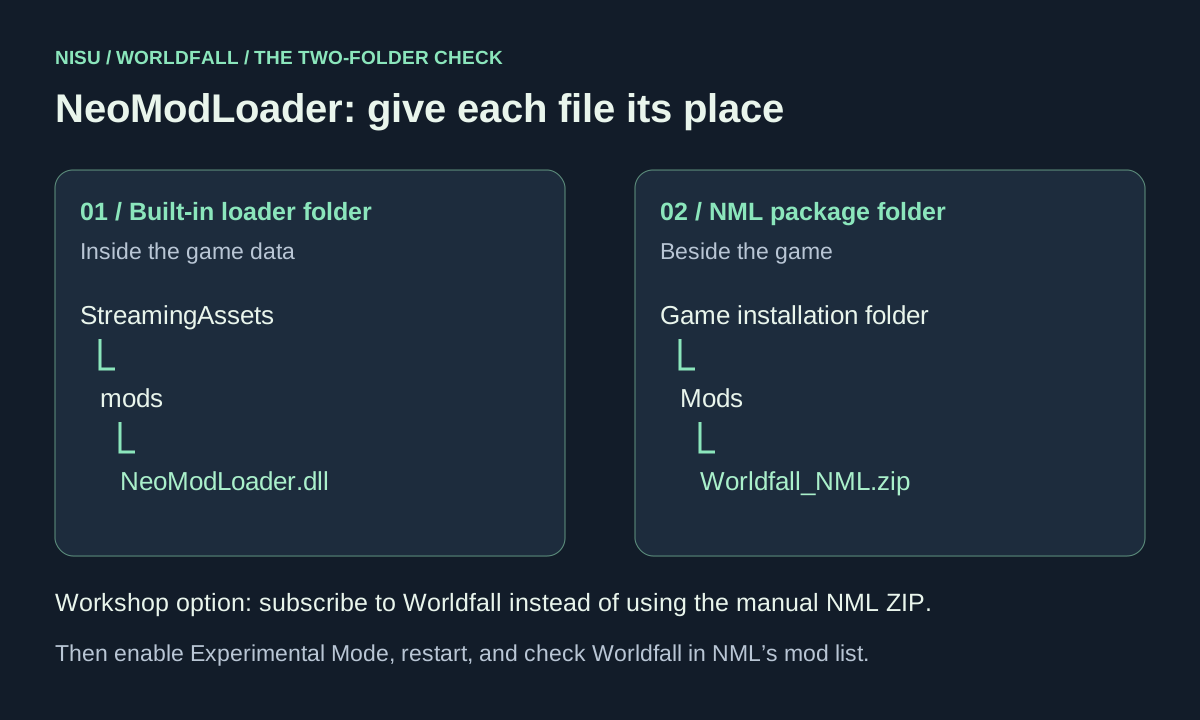
Subscribing to NeoModLoader downloads it through Steam; the author says you still have to put NeoModLoader.dll into WorldBox’s built-in mods folder once. Get that file from the NML release linked on the author’s install page, or copy it from steamapps/workshop/content/1206560/3080294469.
Put NeoModLoader.dll into worldbox_Data/StreamingAssets/mods on Windows, Linux or Steam Deck. On Mac, use the app-package path in the diagram above. Enable Experimental Mode, restart, and confirm that NML itself is running before checking Worldfall.
For Worldfall, either subscribe to the author’s Workshop item or put Worldfall_NML.zip into the capital-M Mods directory NML created beside the game. Launch again and check NML’s mod list. The Workshop item ID is 3814551764; its downloaded directory should contain Worldfall.dll and mod.json.
The lowercase StreamingAssets/mods directory loads NML itself. The separate Mods directory is where the manual NML package goes. Putting an NML package into the first folder, or putting NeoModLoader.dll only into the second, mixes the two steps.
Keep one Worldfall installation. When switching to NML, move the standalone Worldfall.dll out of StreamingAssets/mods; the Workshop diagnostics also name old FirstPerson.dll copies. Keep NeoModLoader.dll there. The current author notes describe an Apple Silicon exception in which the website build yields to NML, but avoiding duplicates is the clearer setup.
If Worldfall does not appear, start with what still works
First check whether Worldfall’s own F1 or F2 menu opens. If it does, loading succeeded; a missing NML entry alone does not diagnose a failed direct installation. If neither opens, work down the checks below.
Test changes one at a time and restart afterward. Before replacing files, keep a copy of saves you care about. That is an editorial precaution for a changing beta, not evidence that this release corrupts saves. Do not overwrite an only copy of a world while investigating a crash.
| What you see | Check next | Action from the author’s diagnostics |
|---|---|---|
| Nothing changes; NML is absent | Loader placement and Experimental Mode | Put NeoModLoader.dll inside lowercase StreamingAssets/mods; enable the setting and restart. |
| NML works; Worldfall is missing | Workshop download | Check steamapps/workshop/content/1206560/3814551764 for Worldfall.dll and mod.json. For an empty/missing folder, the author suggests resubscribing and restarting Steam. |
| It worked before a game update | Experimental Mode | WorldBox updates turn it off. Enable it again, then restart. |
| New release features are missing | A second, older DLL | For NML, remove standalone Worldfall.dll or FirstPerson.dll from StreamingAssets/mods; retain the loader. |
| Old WorldBox errors | Base-game version | The 0.9.8 notes say WorldBox below 0.51 is disabled with an update message. Update the base game. |
| Crash or repeated error | Player.log and exact versions | Use the support link on the author’s Workshop page; include platform, install route and the log. |
Check the file date as well as the version number
The author’s site and GitHub mark beta 0.9.8 as current when checked on October 19. The release was published October 13, but its Windows, NML and Android ZIP assets were updated October 16. The release notes also include October 16 fixes. A file named 0.9.8 can therefore predate those fixes.
CurseForge’s file list shows a 0.9.8 upload on October 15 and another on October 13. Its game-version tag says 0.21.0, while the author’s newer notes refer to WorldBox 0.51 as the minimum for loading. These fields disagree. Use the author’s current install/release instructions for setup; the listing tag does not establish that an old WorldBox build is supported.
GameBanana identifies the same WorldBox mod. For an update, begin at the author’s download page and compare its release notes and asset date. Avoid mixing an archive from one listing with instructions for a different edition.
The latest release records fixes for endless digging audio, towns replacing your weapon, bedroll slot selection, cave entry and pickaxe mining. If one of those matches your problem, check whether your downloaded file predates October 16 before trying unrelated workarounds.
A first run: enter a body, open help, then explore
Select a creature and press G to possess it, or zoom into the world. Try this in a small world first so you can separate loading trouble from the cost of rendering a busy town. Press G again to leave the body. F1 is the full controls reference; F2 opens the mod’s settings.
For an easy orientation task, walk to a town and speak to someone with E. The author describes conversations, furnished homes and creatures going about their lives in the same running world. A controlled creature has its own abilities; X uses the relevant ability. These are published mechanics rather than actions completed by Nisu.
Open Tab for your bag and crafting, M for the world pages and Y for town planning. Inspect available recipes and prompts before spending materials. The source material changes quickly, so this guide does not invent a universal equipment route, guaranteed quest reward or character build.
| Task | Published control |
|---|---|
| Possess / release a selected creature | G |
| Look, walk, swim; sprint | Mouse + WASD; hold Shift |
| Attack or gather from a target | Left mouse button; hold for gathering |
| Guard / parry | Right mouse button; time the raise for a parry |
| Talk, doors, boarding / other actions | E / hold E |
| Tool wheel | Hold Q |
| Bag and crafting / world pages / planning | Tab / M / Y |
| Creature ability / take over the creature you face | X / middle mouse button |
| 3D god view / free camera on the map | V / F |
| Controls / settings | F1 / F2 |
Watch the perspective before changing your setup
Papitron’s October 10 video shows the WorldBox mod in play. Its chapter at 0:00 introduces the 3D view; 3:52 moves to personal maps and 5:32 explores mechanics. Use it to judge the viewpoint and interaction style.
The video predates the October 16 revisions. Its picture and menu layout may differ from your current download, and it does not prove that a particular Mac, controller or mod combination works.
Third-party gameplay, published October 10, 2026. Chapters: 0:00 3D exploration; 3:52 personal maps; 5:32 mechanics. Earlier than the October 16 fixes; not a Nisu playtest.
Lag, Mac crashes and platform limits
Players in the launch thread asked about lag, other mods and Steam Deck. The author’s reply suggested trying GPU rendering through F2. That is a reported troubleshooting suggestion, not a benchmark or a guarantee that GPU is faster on every machine.
The current world page offers graphics looks and a Low preset, with rendering sizes from 640×360 to 1920×1080. Start with a smaller world and Low quality, then change one option at a time. Lowering picture size or draw distance is a reasonable diagnostic; no measured FPS gain is claimed here.
For Mac, the 0.9.7 notes describe loading-crash fixes and keeping 3D sound off on macOS. The current install page recommends NML on Apple Silicon. If an old Mac problem persists, first check the package date and route rather than treating a launch-week report as the present state.
The Workshop description still labels multiplayer, VR, controllers and Steam Deck early or partly untested. The author supplies an early Android package with Android-specific NML and says it has been tried on few phones. This is not evidence of broad phone compatibility or an iPhone release. Linux installation paths are documented, but that alone does not establish complete hardware coverage.
No comprehensive list of compatible mods or verified minimum CPU/GPU requirements was found in the linked author documentation. A community reply saying another mod worked cannot establish compatibility for your load order. If testing a conflict, temporarily remove optional mods from the test setup and restore them one by one.
Multiplayer, download checks and a useful bug report
For multiplayer, start at F2, Multiplayer and check that both players have the same build. The 0.9.8 notes describe join codes, Steam invites and local-network discovery. The author says automatic router opening depends on UPnP support and notes that a Windows Public network can block joins. A join code does not guarantee every router or firewall will permit a connection.
Download through the author’s install page. It publishes SHA-256 values for the packages. Compare the checksum for the exact archive you downloaded with the current value on that page. Matching a publisher’s hash checks file identity; it does not prove that the program is safe. Nisu has not audited the DLL, and the author’s antivirus explanation is the author’s account.
For a reproducible bug report, include your operating system, CPU type on Mac, WorldBox version, Worldfall package date, direct or NML route, other installed mods and the steps that triggered the issue. Describe whether F1/F2 works. Read the log for personal information before posting it publicly.
| Platform | Player.log location listed by the author |
|---|---|
| Windows | %USERPROFILE%/AppData/LocalLow/mkarpenko/WorldBox/Player.log |
| Mac | ~/Library/Logs/mkarpenko/WorldBox/Player.log |
| Linux | ~/.config/unity3d/mkarpenko/WorldBox/Player.log |
Looking for Loxmyth’s WorldFall instead?
Loxmyth’s WorldFall on itch.io is a separate Windows project, tagged Tetris and world-builder. Its page lists WorldFall_v022.exe. It is not the WorldBox mod described above and does not use these DLL or NML steps.
If that is the game you meant, use its own itch.io page. For the WorldBox first-person mod, return to worldfall3d.com/install. Nisu provides this independent guide and original diagrams; it does not host the mod files or charge for access to them.
Quick help
Why is Worldfall not in my mod list?
Check F1 and F2 first. If Worldfall’s controls or settings open, the mod is running. A direct DLL install need not appear in NML’s list. For the NML edition, check that NML is running and the Workshop download contains Worldfall.dll and mod.json.
Does subscribing to NeoModLoader finish its installation?
No. The author says you must place NeoModLoader.dll in the built-in StreamingAssets/mods folder once, then enable Experimental Mode and restart.
Why did Worldfall stop working after a WorldBox update?
Check Experimental Mode. The author says WorldBox updates turn it off; enable it again and restart before replacing files.
Can I use Worldfall on an Apple Silicon Mac?
The author recommends the NeoModLoader edition on Apple Silicon. Follow the app-package directory diagram and NML steps. Nisu has not tested it on Mac hardware.
Is Worldfall available on mobile or Steam Deck?
The author has an early Android package tested on few phones. Controllers and Steam Deck remain labeled early or partly untested. The desktop installation path does not prove a particular device works; no iPhone build is established by these sources.
Does Worldfall work with other WorldBox mods?
There is no comprehensive verified compatibility matrix in the linked documentation. A launch-thread player reported success with other mods, but that does not establish every combination. Record your load order and isolate optional mods when investigating a conflict.
Is the mod free, and is the download independently audited?
The author provides the beta free and says donations are optional. Nisu has not independently audited the DLL. Publisher checksums identify the expected files; they are not a safety guarantee.
Source and scope
This independent guide draws on Open the author’s install & download page, checked on Oct 19, 2026. Published requirements and rules come from the linked sources; practice routines and examples are Nisu editorial suggestions.
- Author: current downloads, platform paths, controls and checksum values
- Author: dated update history, compatibility changes and fixes
- Author’s GitHub release: beta 0.9.8; assets updated October 16, 2026
- Author’s Steam Workshop listing: NML setup, diagnostics and Player.log paths
- worldfall3d on CurseForge: 0.9.8 file dates and game-version metadata
- Worldfall on GameBanana: another listing for the WorldBox mod
- Author: graphics options and 3D world views
- Author: possession, conversations, homes and towns
- Player question: installed on Mac, but mod not visible; asks for visual help
- Launch discussion: player questions about lag, other mods, mobile and Steam Deck
- Loxmyth’s separate WorldFall project on itch.io