

Codes: what the checked recording actually shows
Tap Simulator Reborn has a Codes panel inside Settings. The strongest result in our October 23 check is BOO!: lucentlx’s October 21 Halloween recording shows a green redemption message and a reward toast for one Luck Potion I and 100 Candy Corn. Its Candy Corn counter rises from 741 to 841. Keep the exclamation mark when entering BOO!.
The same recording enters spooky in lowercase and receives an already-redeemed response. That establishes recognition on that account; it does not show a second fresh payout or tell us whether another account can still claim it. The creator’s description reports 250 Candy Corn plus Luck, Coins and Gems potions. Those reward amounts remain a creator report rather than a payout observed in the inspected passage.
No expiry date was established for either code. We have no independently verified expired-code list to add. A copied list, a video title or a future-looking month label is weaker evidence than the response in the actual game. Check the status column before deciding what to try.
| Code | Reward evidence | Status in the checked recording |
|---|---|---|
| BOO! | 1 Luck Potion I and 100 Candy Corn shown in-game | Successful redemption in October 21 footage; current account eligibility not tested |
| spooky | Creator reports 250 Candy Corn and Luck / Coins / Gems potions | Already redeemed on the recorded account; fresh reward not observed |
How to redeem: Settings, Codes, then Redeem
Join Tap Simulator Reborn by Cursor Makers, using Roblox place 72858262610964. The official description credits @dobdev and @Zued. A similarly named Tapping Simulator experience can have a different developer, code list and interface.
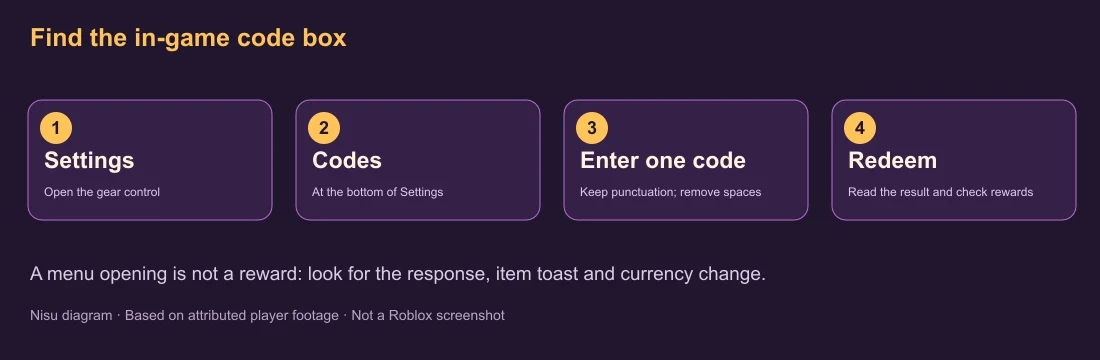
Open the gear-shaped Settings control, then select Codes at the bottom of the Settings window. In the blue Codes popup, enter one code into Enter code here and press the green Redeem button. The October 21 footage shows this menu at about 2:30 and the BOO! success at about 2:40.
Read the text below Redeem before closing the window. A successful response can include an item toast as well as a currency increase. Check the named potion in your inventory and the Candy Corn counter for the Halloween reward. Opening the box, pasting a code or pressing the button alone does not establish that anything was granted.
Use the spelling shown in the table, remove leading or trailing spaces and keep punctuation. We did not test whether the system ignores letter case. You do not need a browser extension, script executor or an external reward site to follow the demonstrated in-game route.
Dated Halloween gameplay: trick-or-treat rewards near 0:20, Hallow Lord board near 1:40, Settings and Codes near 2:30, successful BOO! reward near 2:40. spooky returns already redeemed. Later creator giveaways are unrelated to in-game code validation.
If a code does not give a reward
Already redeemed means the checked account has previously claimed that code. In the recording, this appears for spooky even though the next code succeeds. Repeating the same entry does not demonstrate an additional claim, and it should not be confused with a first-time reward.
For an invalid or expired response, first check the exact experience, spelling, punctuation and accidental spaces. If those match, keep the actual error text: a generic failure does not reveal the precise expiry time. Rejoining may refresh a stale session, but it is not a proven way to revive an expired or previously claimed code.
If the response says success but a reward seems missing, distinguish the inventory item from the currency counter. BOO! gives a potion and event currency in the inspected footage; it is not a free Robux promise or a guaranteed rare pet. Check the item name before expecting a different balance to rise.
For new announcements, start with the developer links attached to the official Roblox experience and Cursor Makers community. The group description and public shout did not supply additional code announcements in our check. We have not turned that absence into a claim that no other codes exist.
After codes: tap, hatch and read the rebirth cost
The official game loop is tapping for Coins, hatching eggs for pets, rebirthing to grow stronger and unlocking islands. Codes provide a small starting reward within that loop. They do not replace meeting a rebirth cost or the requirement on an island gate.
Tap to raise Coins, inspect the egg price and hatch a pet when you can afford it. Then compare the pets you can equip with your current team. In the checked early-game footage, the Rebirth panel displays Coin costs and a Rebirth Benefits summary, while Gems have their own counter and a Gem Upgrades building.
Before rebirthing, read the currently available option and its displayed cost. Use the benefits panel to understand the next step instead of copying the enormous balances from an advanced player’s recording. Exact costs and multipliers change with progress; the Halloween video’s trillions of rebirths are not a beginner requirement.
When a portal or island is locked, read its requirement in your own session. Do not spend a timed boost while deciding which menu to open. Finish navigation and choose an activity before activating an inventory potion; no tested optimum potion stack, hatch rate or leaderboard result is claimed here.
Halloween: codes are separate from repeatable activities
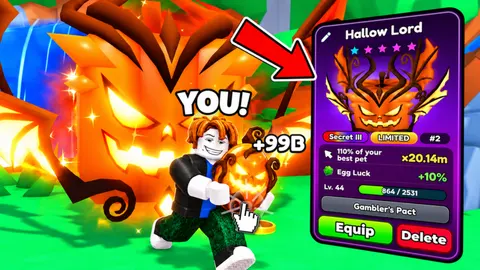
The October 21 recording shows trick-or-treat houses, a candy bag counter, Halloween daily tasks and a Hallow Lord event board. These are other ways to work on Candy Corn while the event is available. Their presence in dated footage does not establish a permanent Halloween area or its end date.
At the village houses, approach the trick-or-treat interaction and watch the reward toast and bag counter. The footage shows Candy Corn and a Coins Potion I as one house reward, then further house visits increasing the counter. A single house result is not a guaranteed reward table for every visit.
The Candy Witch’s quest board in the inspected footage lists visiting six houses, tapping 3,000 times on any island and playing for 20 minutes. Check your own board and reset timer before planning a session; those are dated task examples. The Hallow Lord board says it rises every hour on the hour and displays a countdown. Read the live board rather than inferring a universal event timezone from the video.
The earlier update recording below also shows the Volcano island and Halloween village. It is useful for recognizing the setting and menus. It does not establish that every viewer has unlocked the same portal, owns the displayed pets or can reproduce the creator’s advanced balances.
Original October 18 update recording linking the exact official experience. Inspected passages include Volcano unlock near 0:20, tapping near 1:10, hatching near 3:30 and Halloween village quests near 5:40. The title alone is not code-redemption proof.
Confirm the right game before following another code list
The checked Roblox universe is 10629695169, with starting place 72858262610964 and Cursor Makers as its creator. Those identifiers are more reliable than a similar title, thumbnail or an old search snippet. The official listing was updated October 22 UTC in the October 23 check.
The current official description no longer uses an older cached trading-coming-soon line, and the inspected Halloween interface already includes a Trade button. This guide does not verify trade prices, scam protection, item values or completed trades. Do not treat the presence of the button as a demonstrated trading tutorial.
Nisu provides this reference page and attributed video embeds. The Roblox experience, account, progress and rewards remain on Roblox. Use the official entry if you want to play; the code table and menu explanation can be read here without opening a competitor guide or reward mirror.
Quick help
Where is the Codes button in Tap Simulator Reborn?
Open Settings with the gear control and select Codes at the bottom of that window. The blue popup has an entry field and a green Redeem button.
What does BOO! give?
The inspected October 21 player recording shows one Luck Potion I and 100 Candy Corn after a successful BOO! redemption. Nisu has not freshly claimed it on another account or verified an expiry date.
Is spooky confirmed as a fresh working code?
The checked account received already redeemed. The creator reports its rewards in the description, but a fresh spooky payout was not observed in the inspected passage.
Why does a code say already redeemed?
That response indicates the account has already claimed it. It differs from an invalid or expired-code response; repeatedly entering it does not demonstrate a new reward.
Do these codes give free Robux?
The observed BOO! reward is an in-game potion and Candy Corn. No free Robux payout or guaranteed rare pet was observed.
Source and scope
Checked October 23, 2026 against the official Roblox experience and selected passages of original player recordings. BOO! succeeded in lucentlx’s October 21 recording; spooky returned already redeemed in that account. Nisu has not logged into the Roblox client, redeemed either code on a Nisu account, bought a pass or verified an expiry date. Video results are dated evidence, not a promise that an unclaimed code remains active today.