
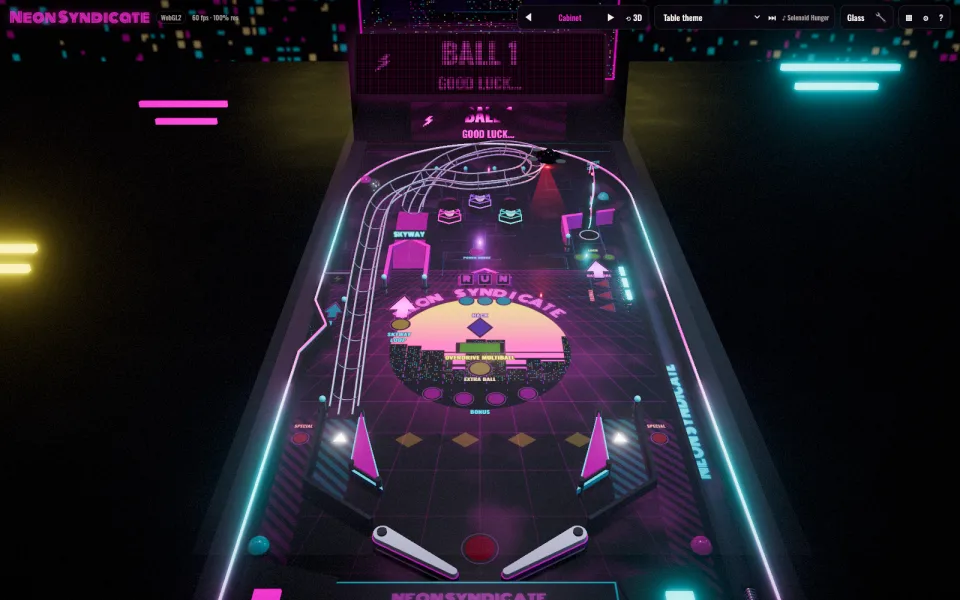

Choose among four tables, then learn the controls
Realms of Tilt is KFPlay’s browser pinball cabinet. Its table selector names Haunted Hollow, Leviathan Deep, Neon Syndicate and Tomb of the Sun King. We opened the browser interface and read the controls; rendering remained at shader compilation during our bounded check, so this is not a completed playtest or a score guide.
T changes the table and V or the number keys selects a camera. Before chasing a jackpot, choose a view where you can follow the ball near the flippers. The official page recommends desktop play and also lists touch controls. We have not verified a particular phone or controller.
| Task | Keys | Action |
|---|---|---|
| Left flipper | Left Shift / Z / Left Arrow | Raise the left flipper |
| Right flipper | Right Shift / Slash / Right Arrow | Raise the right flipper |
| Launch | Space / Down / Enter | Hold to charge; release to launch |
| Nudge | Q / E / W | Nudge the cabinet |
| Camera | V or 1–7 | Change viewpoint |
| Table | T | Open table selection |
| Pause | P / Esc | Pause and settings |
| Music | M / N | Toggle music / next track |
Light the lock before collecting three balls
The game’s published help describes the lock sequence more precisely than “start multiball”: complete the three standup letters to light the lock, then shoot the lock scoop. After three balls are locked, multiball starts. Each table uses the same underlying rule sequence, though its visual theme and ramp route differ.
During multiball, ramp shots award jackpots that increase with successive hits. The same help text describes top lanes raising the bonus multiplier, cleared drop targets awarding points, and an extra-ball light after every second drop-target clear. It also lists a frenzy after 25 bumper hits. These are the published rules, not counters we independently tested.
For a first attempt, separate the objectives: letters light the lock; the scoop collects a locked ball; ramp shots serve the jackpot objective once multiball is active. Mixing those jobs together can make a lit feature seem unresponsive when you are aiming at a different target. We do not have a verified shot timing or fastest route for each table.
Use the Haunted Hollow recording to recognize the layout
The short video embedded on KFPlay’s game page shows Haunted Hollow in action. In the checked portion near 21 seconds, the recording shows the Ball 1 display, upper ramps, letter targets and lower flippers. Around 53 seconds it shows the score display during play on the same table.
Use that view to recognize the parts of the cabinet before following the lock instructions. The neon cover image above is a different table, Neon Syndicate. The recording does not by itself demonstrate every table, all scoring rules or an optimal technique.
Official-page-linked recording of Haunted Hollow. Checked footage shows the live table and score display; it is not a four-table walkthrough or a verified scoring strategy.
Glass-Off is for exploring the playfield
G toggles Glass-Off. The published control help describes dragging the ball by hand and adding a new ball with B or a double-click while the glass is off. That gives you a different way to inspect a target or route from keeping a ball alive with normal flipper inputs.
Keep those experiments separate when comparing your attempts. Manually moving or adding balls changes the conditions of the run. We have not verified whether the current build marks, excludes or separately stores scores made with these assists, so this guide does not promise an unranked mode or a protected normal-score list.
F1 or Backtick opens the Operator’s Menu. Its published interface includes cabinet adjustments, diagnostics and score-reset controls. You do not need those reset actions to learn the flipper and plunger keys. Read the label before changing a cabinet setting, especially if you want to retain existing local scores.
Keep scores in the same browser
The developer says scores and preferences are stored in your browser and do not sync across devices or between the hosted and downloaded editions. Clearing browser storage can erase them. If your score seems missing, first check that you returned to the same browser and edition instead of assuming a shared online account.
The browser game contains all four tables. The separate offline download is offered as a purchase on the official page and is described as the same game, not a source of extra tables. If you choose that edition, the developer says to keep its extracted files together and open index.html in a desktop browser. Buying it does not transfer a browser score.
For slow rendering, the official guidance is a current browser with hardware acceleration and WebGL2 support, and lower graphics quality in Settings. WebGPU is used where available with a WebGL2 fallback. Our shader-compilation wait is an observation from one check, not evidence that every device fails or that any particular setting will fix it.
Quick help
Which key changes the table?
T opens table selection. The four named tables are Haunted Hollow, Leviathan Deep, Neon Syndicate and Tomb of the Sun King.
How do I trigger multiball?
The published help says to complete the three standup letters, shoot the lit lock scoop and lock three balls. Ramp shots then award growing jackpots during multiball.
Why does B not act like a normal launch key?
B adds a ball in Glass-Off mode. A normal plunger launch uses a held Space, Down or Enter input followed by release.
Will my browser scores appear in the offline edition?
No automatic sync is documented. The developer explicitly says browser and downloaded editions keep separate local scores and preferences.
Source and scope
This independent guide draws on Play Realms of Tilt on itch.io, checked on Oct 12, 2026. Published requirements and rules come from the linked sources; practice routines and examples are Nisu editorial suggestions.