

MW4 on Steam: choose the full game, not just an upgrade
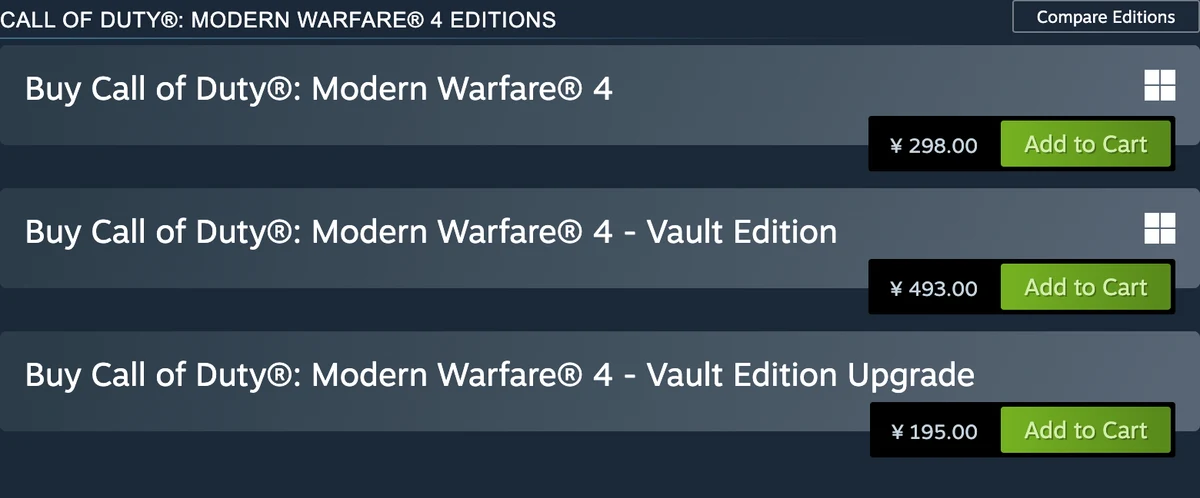
Modern Warfare 4 is on Steam as app 4435490, published by Activision. Our October 23 regional store check displayed Buy for the standard game, Vault Edition and a separate Vault Edition Upgrade. The upgrade is an add-on for an eligible base game; compare the item name with your existing library before buying.
The checked China-region view displayed ¥298 for the standard game, ¥493 for Vault and ¥195 for the upgrade. These are dated regional store displays, not worldwide prices or a completed checkout. Your account country, currency, current offer and final purchase screen determine what you can buy and pay. The listing warns that content, services and online play are not available in every region.
A Steam purchase belongs to its storefront entitlement. Do not assume that owning the game on Battle.net, a console or another PC store adds a Steam license. The listing requires an Activision account and a mobile phone number linked to the Steam account. Check the intended account, region and base-game ownership before paying again.
Download through your Steam library; preload dates are past
Activision’s installation guide says to sign into Steam, open Library, select Call of Duty and use Install. It currently names the Call of Duty library entry, rather than telling Steam players to install the Battle.net edition. Use the Steam account that owns MW4 and allow its required updates to finish.
If the game entry is present but a mode pack is missing, inspect its Properties and DLC tab. In the October 15 player thread, AbilityDull8749 demonstrated finding Campaign, Multiplayer and DMZ packs there after another player could not find a download. That is a dated player report of the menu, not proof that every account already owns or has installed every mode.
The official September 29 PC post scheduled PC preloading for October 15 at 9 a.m. PT and the full game for October 23 at local midnight. Those dates have arrived; do not wait for a future preload countdown. A completed download and an unlocked mode are separate states. Check the current library, local release notice and any service outage if a tile remains locked. The early Campaign and DMZ windows remain historical access dates, rather than a second purchase requirement after launch.
Check SSD space, graphics hardware and boot protection
Both Steam and Activision list a 115 GB SSD requirement at launch, with additional space possible for updates. All published desktop tiers need broadband internet, DirectX 12 compatibility and a supported Intel or AMD processor with AVX. Intel Arc graphics also require Resizable BAR. A laptop GPU with a similar name is not automatically the supported desktop model.
TPM 2.0 and Secure Boot are required. Check Activision’s current guidance and your PC manufacturer’s instructions for the exact warning you receive. Nisu has not inspected your BIOS or tested this game, and a store-page warning alone cannot diagnose your computer.
The recommended figures below come from Activision Support’s October 1 desktop table, described there as a 90 FPS Multiplayer High-settings target. Its NVIDIA recommendation is RTX 3060 Ti; the checked Steam listing instead says RTX 3060 and lists an i7-8700K rather than Support’s i7-8700. These are different published entries. Use the named source and current hardware guidance when comparing a purchase, rather than treating this table as a Nisu benchmark or FPS guarantee.
| Component | Minimum desktop specification | Activision Support recommended |
|---|---|---|
| Windows | Updated Windows 10 64-bit | Updated Windows 11 64-bit |
| CPU | Ryzen 5 1400 or Core i5-6600 | Ryzen 5 3600 or Core i7-8700 |
| RAM | 8 GB | 16 GB |
| GPU | RX 470; GTX 970 / 1060; Arc A580 | RX 6600 XT; RTX 3060 Ti; Arc B580 |
| VRAM | 3 GB | 8 GB |
| Storage | 115 GB SSD at launch | 115 GB SSD at launch |
If Steam downloads or launching still fail
First separate a missing purchase, an unfinished content pack and a startup error. Confirm your receipt and Steam account, let pending downloads finish, and check the publisher’s current service notices. Opening Call of Duty HQ is not by itself a fix for missing ownership, regional availability or boot-protection requirements.
For missing or corrupted installed files, Steam’s support route is Library, the game’s Properties, Installed Files, then Verify integrity of game files. Let the check finish before launching. This repairs the files Steam manages; it cannot add a license, override an anti-cheat requirement or guarantee that every crash is resolved.
Keep Windows and the GPU driver current through the manufacturer’s normal update route. For TPM, Secure Boot or firmware warnings, follow the linked official security guidance rather than downloading unofficial bypass files. If the problem continues, record the exact error and the owning storefront for Steam or Activision Support. No reinstall, BIOS change or working launch was performed by Nisu for this update.
Check the mode, date and Game Pass rule
Activision lists MW4 DMZ early access from October 20, 2026 in Pacific Time, following Campaign early access on October 16. The full release is October 23. The early-access dates have arrived, but your edition, platform account and the current service status still determine whether you can enter. The checked edition page does not specify an exact DMZ unlock hour.
Call of Duty’s October 15 announcement says MW4 must be purchased separately at launch and is planned for Game Pass in Holiday 2027. A subscription that covers console online play is a different requirement from owning the game or qualifying for early access.
Before arranging a session, agree on the mode and check a current publisher or platform unlock notice. October 20 on a calendar in Asia is not a confirmed Pacific unlock timestamp. Avoid countdowns or region-change shortcuts built from an unconfirmed hour.
| Mode or access question | Published position | Before you queue |
|---|---|---|
| Campaign early access | October 16, 2026 (PT) | Check the qualifying digital purchase. |
| DMZ early access | October 20, 2026 (PT) | Confirm the actual unlock on your platform. |
| Full release | October 23, 2026 | Keep this separate from the two earlier windows. |
| Game Pass inclusion | Not at launch; planned Holiday 2027 | A separate purchase is required for launch play. |
Competitive Multiplayer opens with the October 23 launch
MW4 competitive Multiplayer belongs to the full October 23, 2026 release. The October 20 digital early-access window is for DMZ. On October 21, an accessible DMZ deployment therefore does not prove that Team Deathmatch or the rest of competitive Multiplayer is already open. Check the platform’s actual unlock notice rather than reusing an unconfirmed DMZ hour.
The announced platforms are Xbox Series X|S, PlayStation 5, Nintendo Switch 2, and PC through Battle.net, Steam and Xbox on PC. You need the relevant game entitlement on the account and platform you intend to use. Standard includes the game; Vault adds its listed extras. Neither a past beta invitation nor a Game Pass subscription establishes a launch entitlement.
If your goal is Multiplayer, install the appropriate mode content through your platform’s normal game-management screen, check the linked account and confirm the launch window. On PC, read Activision’s current TPM 2.0 and Secure Boot requirements. This guide does not recommend region changes or unofficial files as unlock workarounds.
| What you want to play | Relevant date or condition | Start here |
|---|---|---|
| DMZ extraction | Digital early access from October 20 PT; qualifying edition/account | Use the DMZ first-run checklist below |
| Competitive Multiplayer | Full release October 23; game ownership and platform access | Choose a mode, then a Default Loadout or custom class |
| Game Pass-only access | MW4 excluded at launch; planned Holiday 2027 | Check separate ownership before troubleshooting |
| Warzone weapon integration | Announced for Season 1 later in 2026 | Do not assume launch-day integration |
Choose a mode before planning a loadout
The current official Multiplayer page confirms twelve new Core 6v6 maps, plus Gunfight spaces, Kill Block and large-scale Ground War: Combat Outpost maps. These are different match structures, not a claim that every map supports every playlist.
For a respawn match, the announced launch list includes Team Deathmatch, Domination, Hardpoint, Kill Confirmed, Free for All, Counter Attack, Inflation and Hijack. Search & Destroy provides the one-life tactical alternative. Gunfight has 3v3 and 10v10 variants in Kill Block, while Gun Game and Drop Zone are listed as launch party modes.
In Inflation, eliminations generate cash and deaths put some collected money back at risk; the team’s total is the objective. Combat Outpost uses outposts and resources across larger spaces with infantry and vehicles. Kill Block changes its modular layout, so a remembered route is not a promise that the next configuration has the same sightline.
These are the publisher’s announced launch offerings, not Nisu playtest results. The dedicated launch list comes from the August NEXT article, while the current mode page confirms the broader structures. An old Beta label in that article is not evidence that the August test remains playable or that every test playlist is the release playlist.
The announced twelve Core maps
The publisher’s launch roster names Cachette, Coal, Lithium, Lotus, Mumbai, Munition, Nautical, Reactor U92, Rooftops, Sentry, Silkworm and Transit 213. The August source labels the assets as in development; the live Multiplayer page still confirms the twelve-map Core offering. This is an announced roster, not twelve maps that Nisu has personally tested.
Keep the Core list separate from the broader map offering. Kill Block is a modular facility rather than a thirteenth named Core map in that list. Ground War has larger combat spaces. Imjin Farmland and Wolves Stadium were explicitly described as Beta Combat Outpost maps; we do not silently reclassify those two Beta announcements as a complete final launch map list.
Use an initial match to identify objectives and the actual configuration you receive. No fastest route, spawn-trap map or strongest position is established here. Tactical advice that depends on a precise layout needs gameplay evidence from the current playlist.
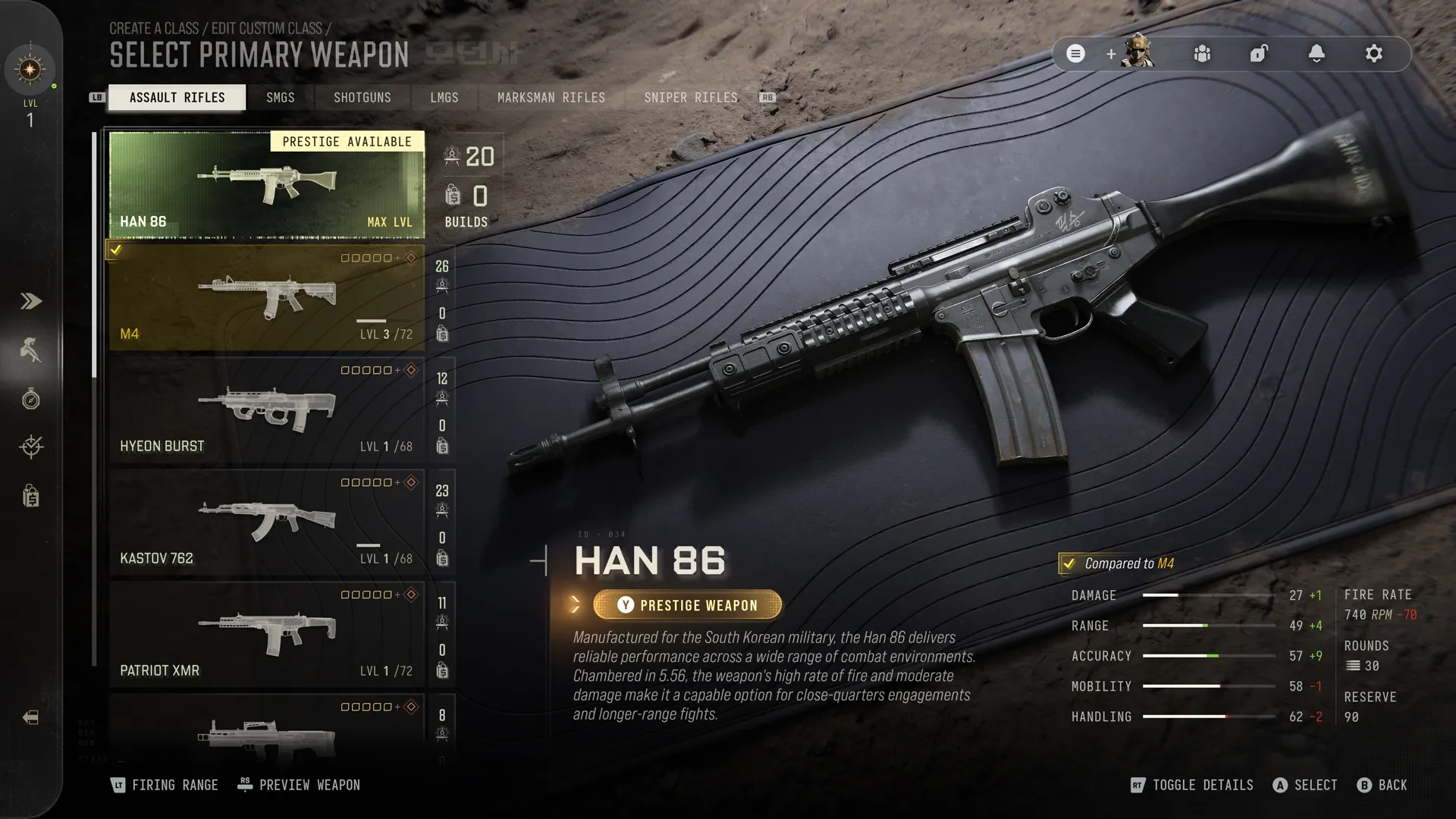
Use Default Loadouts until overall Player Level 4
Create-a-Class unlocks at overall Player Level 4. Before that, Multiplayer offers premade Default Loadouts, so a locked custom-class screen is not by itself a missing purchase. The threshold refers to the shared overall player track, not DMZ Player Level 4 or an individual weapon’s fourth level.
Once available, open Create-a-Class in the Multiplayer menu and review your weapon, equipment, perks, Field Upgrade, Killstreaks and assigned Operator. The official mode page describes G.U.N.N.Y. starting suggestions for Short Range, Long Range and Balanced setups. Treat those as starting points, not an independently tested best build.
To check a locked item, the official October 19 guide says to open the Multiplayer side menu, select your player profile and choose Progression. For attachment levels, use the weapon’s own Progression menu inside Gunsmith. These two screens answer different unlock questions.
Read the weapon and equipment unlock separately
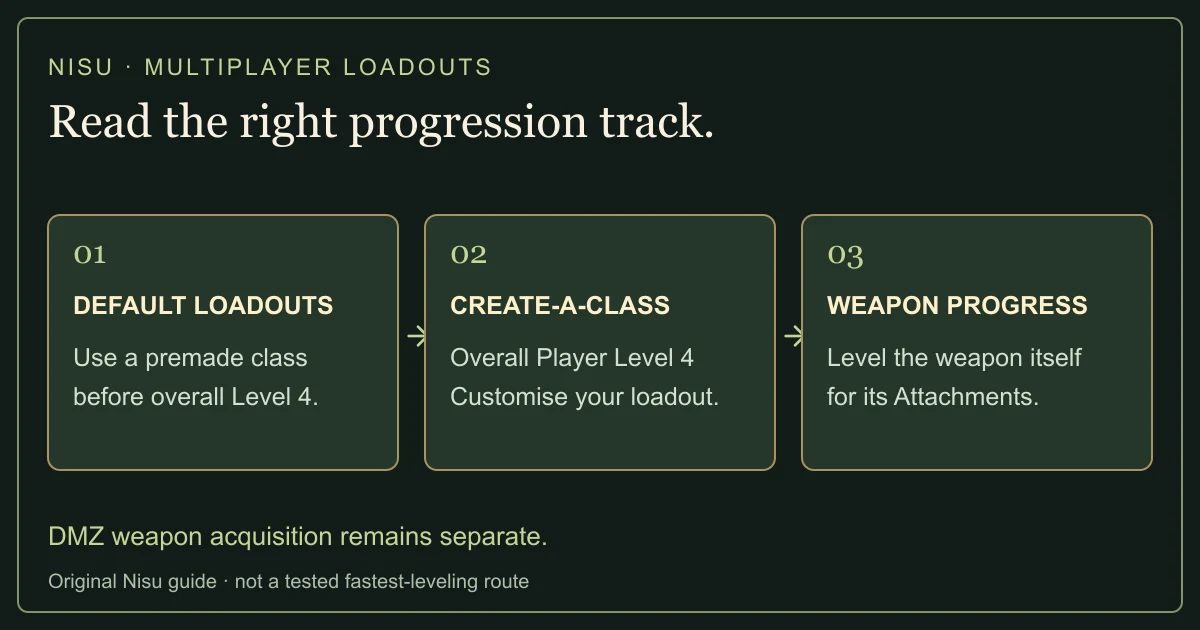
The October 19 launch guide lists thirty-three weapons: twenty-four primary weapons, eight secondary weapons and one melee weapon. The primary classes are eight assault rifles, five SMGs, two shotguns, three LMGs, three marksman rifles and three sniper rifles. The secondary group contains four pistols and four launchers. This weapon count is separate from the same article’s thirty-three Operators.
At overall Player Level 4, the listed starting custom-class choices include Han 86, ISO Nightshade, Rezi 12, Finn LMG, MAR-9, KG-7 Vulcan, PILA and the FSS Carbon Edge 1095 knife. Later examples include VEL 46 at Level 5, M4 at Level 14 and Cronen Squall at Level 55. Those are unlock requirements, not power rankings.
Equipment has its own player-level requirements. Level 4 opens Flash and Smoke Grenades, Frag and Sticky Grenades, Portable Radar and DDOS. Later examples include Munitions Box at Level 6 and Trophy System at Level 14. A Killstreak’s player unlock is also different from the number of kills required to earn it during a match.
Attachments develop through weapon progression, and an unlocked compatible attachment becomes available across weapons that use it. Availability does not remove every other requirement in DMZ: the FOB Gunsmith still has its DMZ-level gate, and acquiring or purchasing a weapon for a deployment still uses the extraction mode’s rules.
Shared weapon progress does not merge every progression system
DMZ Player Level 1–70, overall Player Level 1–55, Operator development and weapon levels are separate tracks. The official FOB guide says DMZ XP contributes to the overall player track, but Multiplayer and Warzone XP do not raise your DMZ level. This is why having overall custom classes and having a particular FOB station are different states.
Players in the October 15 DMZ discussion ask whether early DMZ play can advance Multiplayer and whether the two level numbers describe separate systems. The official progression rule answers the relationship. It does not guarantee that a player will reach overall Level 55 before launch, and Nisu has not measured an early-access leveling rate.
A weapon unlock for Multiplayer is also different from possessing a gun in a DMZ backpack, extracting a Weapon Manual or having enough DMZ Cash to buy a chosen build. Use the DMZ progression section below for those acquisition rules. Do not use an Operator challenge, weapon-level requirement or loadout thumbnail as a substitute for the named requirement you actually need.
Match the purchase to the account you will use
The early-access offer covers Standard Digital and Vault Edition; Vault is not required just to receive the listed windows. A physical preorder does not establish the same digital entitlement. The published platforms are Xbox Series X|S, Xbox on PC, PlayStation 5, Battle.net, Steam and Nintendo Switch 2.
Check your receipt and native store library together. Confirm the edition, the platform and the signed-in account before buying an upgrade or reinstalling anything. When helping a friend, ask them which storefront owns the purchase rather than assuming that every PC launcher shares it.
Console online features have their own subscription requirements. PC players should check Activision’s TPM 2.0 and Secure Boot guidance. These checks cannot turn a nonqualifying purchase into an early-access entitlement.
Give the first deployment one achievable goal
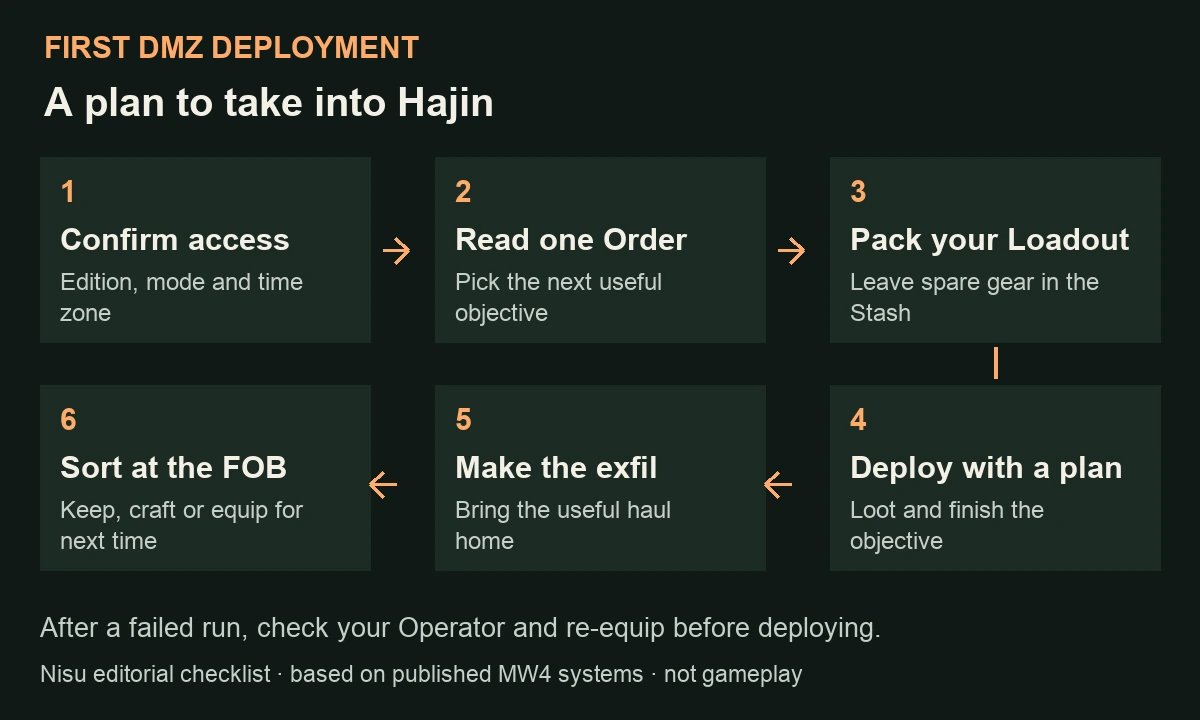
Treat the first session as a short learning run. Write down one objective from the Order you have selected, a place to reconsider the plan and a reason to leave. For example, if the requirement is to bring an item back, finding it is a good moment to reassess the route instead of adding an unrelated boss fight.
Before deploying, decide which gear is worth risking. Spare equipment that is not useful for this objective belongs back at base. A long shopping list makes it harder to notice when you have already achieved what you came for.
The diagram is a planning routine, not a guaranteed route or a screenshot of the game. The official trailer below shows the announced mode’s presentation; it does not prove that a particular account can enter today.
Official October 9 promotional footage, published before DMZ early access. Use it to preview the mode, not to establish live entitlement or an exact unlock hour.
Use the FOB before pressing Deploy
The Forward Operating Base is the home between deployments. The official FOB guide lists the 3D Printer at DMZ Player Level 2, Vendor at Level 5, Gunsmith at Level 10 and Dog Tag Case at Level 20. The Boss Board follows completion of the second DMZ Order.
For a first visit, use the base as a preparation checklist. Pick your active Operator, read the next requirement and compare it with what you are carrying. Testing an unfamiliar weapon before risking it is more useful than filling every available slot.
At Ready Up, Equip Free Loadout provides basic gear when you need to rebuild your Stash. You keep that gear if you extract. Use Edit Loadout for a final check of your plate carrier, backpack, weapon and medkit. Squad Fill can add two allies; turn it off if you intend to enter without matchmaking. Read the selected deployment before confirming.
| Station | Question it helps answer |
|---|---|
| Operators | Who am I sending out, and are they available? |
| DMZ Orders | What am I trying to accomplish? |
| Stash / Loadout | What stays home, and what goes into this run? |
| Firing Range | Can I use this weapon comfortably? |
| 3D Printer / Vendor / Gunsmith | Which unlocked option helps the next deployment? |
Separate Orders from the deployment activity
Orders are the mission directives to check at the FOB and in the Tac-Map Orders menu. Dynamic Operations can be selected before deployment or started through an in-world phone; completed Operations award XP, Cash and a Supply Drop. The Hajin guide also describes Side Ops and higher-risk Lieutenant or Commander encounters.
Use that distinction when planning with a squad. Say which Order you are advancing and which activity is only an opportunity along the way. If an optional fight would jeopardize the item you need to return, the original objective should still guide the decision.
Read the exact requirement on screen, especially its completion condition. Do not infer that reaching a location, picking up an item and extracting that item are interchangeable. Recheck progress after the action so the next route decision is based on what the game actually recorded.
Sort the loot by what the next run needs
Xbox Wire distinguishes basic crafting Resources from rarer 3D Printer Ingredients. Synthetics, Electronics, Chemicals and Metals are the four Resource types. At the 3D Printer, highlight the item you want to craft: the recipe shows the required resources and ingredients, and a green quantity means you have enough. Tag a recipe or ingredient to track what you still need.
Make a short keep list before deploying: useful equipment, the item required by the current objective, and a material you have a reason to collect. If you cannot say what an unfamiliar object is for yet, inspect its in-game description rather than assuming that rarity alone makes it your next upgrade.
After a successful return, sort before immediately deploying again. Keep the next objective visible while deciding what to retain, equip or use. This is a planning habit, not a claim that every container has a predictable drop or that one route is the fastest way to level.
| What you find | A useful first question |
|---|---|
| Equipment or consumables | Does this improve the Loadout I intend to take next? |
| Resources | Which available recipe or base upgrade needs them? |
| 3D Printer Ingredients | Is there a specific craft I am collecting for? |
| An objective item | What exactly does the selected Order require me to do with it? |
| A Weapon Manual | Can I bring it home for the relevant Gunsmith option? |
Plan the exit while you can still change course
The Hajin HUD guide describes a timer tied to worsening radiation and a Threat indicator for enemy response; the Threat indicator does not count rival human Operators. Its published examples rate Deadtown’s exterior Low and Chang-san Air Base’s bunker Extreme. A named POI is not a promise of a safe run.
Check the map before the backpack becomes the only thing you are thinking about. Ask how far the next decision moves you from an exit, whether the squad can travel together and whether you still have enough supplies to leave. Reassess after a fight or when the objective changes.
Leaving is part of completing the plan. Resist turning a useful haul into a search for one more container simply because another marker is nearby. No fixed extraction point, safe timing trick or guaranteed quiet route is supplied here; those depend on the live deployment.
Understand what survives the deployment
Items left in the Stash stay at the FOB. A deployed Backpack and Loadout are at risk; the official guide says Backpack items outside Secure Slots are lost when you fail to exfil. Secure Slots depend on Backpack upgrades, so read the equipment you actually have.
An eliminated Operator can become MIA. Xbox Wire explains recovery with DMZ Cash or dismissal; recovered Operators keep Traits but return without gear. Recovery becomes more expensive with Trait investment.
After a loss, inspect the Operator and equipment state before repeating the same deployment. Decide whether the next goal is recovery, replenishing basic gear or trying a smaller objective. A failed run is useful only if it changes the next plan.
Keep player, Operator and weapon progression separate
DMZ Player Level runs to 70. Operator Traits and Prestige develop separately, while weapon levels are shared with competitive Multiplayer. Gunsmith access at the FOB requires DMZ Player Level 10. Extracting the relevant Weapon Manual lets you purchase that base weapon repeatedly for DMZ Cash; bringing home one gun only gives you that individual weapon. Weapon leveling unlocks attachments rather than replacing either requirement.
Before searching for a missing option, identify which system it belongs to. A locked base station, an unavailable weapon build and a developing Operator are different problems. Check the named requirement in the relevant menu, then choose a deployment that advances that requirement.
DMZ XP also advances the overall Level 1–55 player track. The reverse does not apply: Multiplayer or Warzone XP does not raise your DMZ level. The official guide says earned DMZ XP still counts after a failed exfil. Losing carried gear therefore does not erase the XP you earned during that deployment.
If access is blocked, check the basics before chasing fixes
In the linked DMZ launch discussion, ElectricalWater6269 asks when the mode becomes available, while Triks1 reports that Campaign is still locked despite using Call of Duty HQ. Those are player questions and reports, not official unlock notices or proof of a universal fix.
Work through the edition, signed-in platform account, intended mode and actual access window first. Then check the current installation in the storefront that owns your purchase and the publisher’s support notices. An old beta entry is not evidence of current-game entitlement; simply opening the right launcher does not prove that a reported account issue is resolved.
Record the platform and exact visible error if the mode remains locked. Avoid deleting saves, changing regions or buying another edition merely because one reply says it worked. TheXclusiveAce clip below is dated announcement commentary, not an installation repair or a completed DMZ session.
TheXclusiveAce’s October 9 announcement commentary, previously inspected at 1:00. It explains the early-access announcement; it is not a completed DMZ run or a Nisu access test.
Quick help
Is Modern Warfare 4 available on Steam?
Yes. The official app is 4435490, published by Activision. The October 23 checked store view displayed purchase options; use the account and region where you intend to own the game.
Do I need Vault Edition to play MW4 on Steam?
The standard game is a full-game purchase. Vault adds its listed content; the separately sold Vault Upgrade is not a substitute for an eligible base game.
Does an installed preload mean every mode is unlocked?
No. Downloaded files, ownership, mode content and the actual release window are separate checks. The official PC preload date has passed; inspect your current Steam library and downloads.
Can verifying Steam files fix a TPM or Secure Boot warning?
File verification checks installed game files. TPM 2.0 and Secure Boot are separate PC requirements; use Activision and manufacturer guidance for the exact warning.
What time does MW4 DMZ early access open?
The checked official support page lists October 20, 2026 in Pacific Time, without an exact start hour. Confirm a current publisher or platform notice before converting it into a local timestamp.
Is MW4 included with Game Pass at launch?
No. Call of Duty’s October 15 announcement requires a separate launch purchase and plans Game Pass inclusion for Holiday 2027. Console online-play subscriptions are a separate condition.
Do I need Vault Edition for DMZ early access?
No. Standard Digital also qualifies under the published digital-preorder offer. Confirm the account, platform and actual window attached to your purchase.
Does loot in my Backpack stay safe if I fail to extract?
Not in general. The official FOB guide says Backpack items outside Secure Slots are lost after a failed exfil. Read the slots on your current equipment and leave unneeded spare items in the Stash.
Why can I not build a weapon at the Gunsmith yet?
Check the relevant unlock first. Gunsmith begins at DMZ Player Level 10, and the weapon-building options depend on extracted Weapon Manuals. Do not confuse that with weapon attachment progression.
Does choosing Call of Duty HQ fix a locked Campaign or DMZ tile?
It is not a verified universal fix. The linked player discussion includes a report of Campaign remaining blocked despite using HQ. Check purchase, account, mode, actual access time and current support instructions.
Does competitive MW4 Multiplayer open with DMZ on October 20?
No. DMZ digital early access starts October 20; competitive Multiplayer belongs to the October 23 full release. Your platform’s actual unlock notice and game entitlement still matter.
Is Create-a-Class unlocked by DMZ Level 4?
The Multiplayer requirement is overall Player Level 4. DMZ has a separate 1–70 track, while the overall player track runs 1–55. Before custom classes unlock, use the premade Default Loadouts.
Do Multiplayer XP and shared weapons automatically level my FOB?
No. Multiplayer does not advance DMZ Player Level. Shared weapon levels and attachments do not remove the FOB Gunsmith’s DMZ-level gate, cash requirement or DMZ acquisition rules.
Source and scope
Independent MW4 guide checked October 21, 2026 against Activision Support, the Call of Duty DMZ deep dives and Xbox Wire. Nisu has not played MW4. Publisher imagery and videos are promotional or attributed commentary; the first-run checklist and planning examples are editorial suggestions. The original article was published October 11. Competitive Multiplayer additions were checked October 21 against the live mode page and October 19 launch equipment guide. Map and playlist names are the announced launch slate, with the August source and Beta-only limits identified. Existing October 9 DMZ videos remain DMZ material, not final competitive Multiplayer footage. Steam access, dated regional offers, PC requirements, installation and file-verification additions checked October 23, 2026. Existing DMZ and Multiplayer material retained from its earlier stated checks. No new purchase, download, installed-client test or Steam launch was performed.
- Activision edition conditions and PT dates
- October 15 standalone launch and Game Pass announcement
- October 5 Hajin, Orders, threats and deployment overview
- October 9 FOB, Stash, Operator and Gunsmith guide
- October 9 Xbox Wire: materials, extraction and Operator persistence
- DMZ community discussion: access-time and launcher questions
- Activision PC security requirements
- Current official Multiplayer page: modes, maps, Kill Block and loadout structure
- October 19 official launch guide: overall Level 4 classes, weapons and equipment unlocks
- August 21 NEXT article: announced launch roster; distinguish Beta-only statements
- Player questions about early DMZ and overall Multiplayer progression; not leveling-rate proof
- Official MW4 Steam app: editions, regional prices, account and security requirements
- Activision installation guide: Steam Library, Call of Duty and Install
- October 1 desktop requirements: minimum and recommended targets
- September 29 PC post: PC preload schedule and local-midnight release
- Steam Support: verify the integrity of installed game files
- AbilityDull8749: dated Steam mode-pack and DLC-menu report