
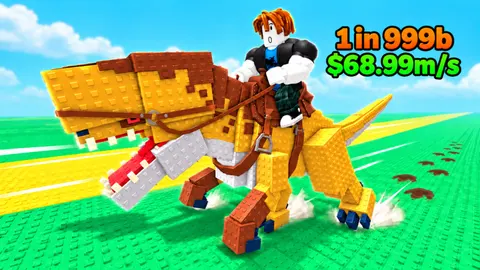

First confirm which Ride a Dino you opened
This guide covers Ride a Dino by and Catch Them All, Roblox place 93523763376122. Its loop is training Grip, leaping onto stampeding dinosaurs, completing a tame and taking the catch back to a ranch. The official description supports desktop, console, mobile and tablet players.
A second Roblox experience is also named Ride a Dino: place 131652231424227, by Dino Riders!. Its official description instead centers on finding hidden eggs, hatching for speed and rarity, riding and mutating. A hidden-egg route from that game will not explain the stampede game’s Grip or ranch controls.
Check the place ID and creator before using a control guide or code list. The table distinguishes only the two verified Roblox entities; this page does not cover ride-on toys or real-world dinosaur events. Nisu hosts this guide, while play and account progress remain in Roblox.
| Check | This guide | Other same-name game |
|---|---|---|
| Creator | and Catch Them All | Dino Riders! |
| Roblox place | 93523763376122 | 131652231424227 |
| Official loop | Grip, stampede taming, ranch pens | Hidden eggs, hatch, speed, mutate |
Catch something you can hold before chasing rarity
Start by reading the target label. It shows a species, rarity and a lightning-marked Required value. Compare that requirement with your current lightning stat before jumping. In BlakeGamer’s early footage, a 20-stat account attempts a 253-requirement Carnotaurus and receives a too-strong warning; a rare-looking target is not automatically an attainable first catch.
On computer, the inspected recordings show Space as the jump prompt. Use the displayed prompt to move onto a chosen mount, then watch its capture progress. Wait for the game’s tame confirmation or an increase in the Secured list before counting the animal as caught.
After a successful tame, another target may be nearby. Decide whether it is within your current requirement range before jumping again. The footage shows riders carrying several secured catches in one outing, but a longer chain is not necessary to understand the first cycle. Returning with a useful catch gives you a clear way to check that the ranch step worked.
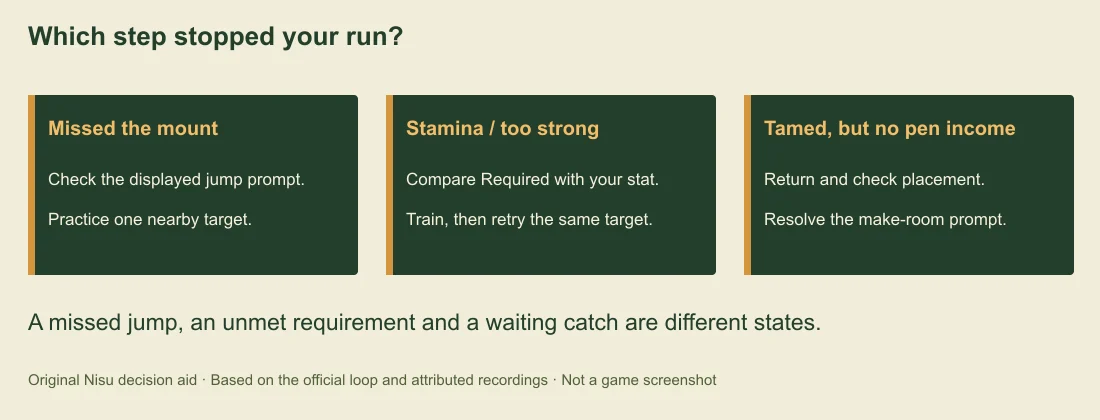
If you keep missing the mount, practice one nearby low-requirement target and watch the jump prompt rather than changing targets mid-action. If you land but get a stamina or strength warning, use the stat check in the next section; repeating the same jump does not itself train your character.
Original October 18 recording linking place 93523763376122. Selected passages show Space riding prompts near 0:15, the pen near 0:45, Not enough stamina near 2:10, a make-room prompt near 3:20 and My pen with an R prompt later. Its edited progression and purchases/boosts are not a fresh-account baseline.
Grip in the listing, stamina in the interface
The developer calls the trainable stat Grip and names Dino Machines as its training source. The inspected interface uses lightning values and displays “Not enough stamina” during failed riding attempts. Keep the developer’s terminology and the actual error together: this is a riding-capacity problem to investigate, rather than proof that the jump key is broken.
First compare the specific target’s Required label with your current stat. Check a smaller target in the same area before assuming the whole biome is inaccessible. A size or special variant can carry its own requirement, so a familiar species name alone is not enough to decide whether it is catchable.
The early tutorial in BlakeGamer’s recording tells the player to put two catches in the pen, save up cash and buy the first Dino Machine at the pen. Follow your current Goal panel and the purchase/placement prompt there; amounts and unlocks can change. Dino Machines train Grip according to the developer; read the live machine display for its current gains.
After a focused training session, compare the new lightning value and retry the same familiar target. That makes the change easier to judge than training once and immediately testing a much rarer creature. Also check the Dino Index: the recording shows claimable cash and lightning rewards on collected entries. Read the reward before pressing Claim; exact amounts vary by entry.
Bring the catch home and check the pen
When the My pen control is available, use it to return. The desktop recording displays R beside that control. A successful catch and placement in the home pen are separate steps: look for the animal in your ranch, its income label and any remaining placement prompt.
Bax’s pen footage shows “Click your pen to make room” while the character carries a catch. If you reach that state, use the pen interaction and inspect its current capacity or expansion choices. Do not sell a useful animal just because it is absent from your current mount slot. First check whether it is still carried, waiting for placement or already in the home collection.
The official description says the ranch earns cash while you ride. The recordings also display an offline-income figure. Use the value shown for your own collection; the footage does not establish an offline cap, exact elapsed-time formula or a guaranteed daily payout for a new account.
Compare the income shown on the animals you actually own before replacing one or spending on capacity. Upgrade the obstacle you can identify: training when target requirements are too high, room when placement is blocked, or another attainable catch when the pen still has space. These are practical checks, not a calculated best-profit build.
Choose the next target using the Index and live labels
Use the Index to see which creatures your account has registered and which rewards remain claimable. In the inspected recording, individual entries and a completed Plains collection have separate Claim controls. Collection progress gives you a concrete next objective without assuming that a thumbnail’s headline dinosaur is your next achievable mount.
The official listing advertises more than 50 species and names areas such as Plains, Desert, Jungle, Snow and Volcano. Treat the live route bar as the current map: updates can add or change areas, and the article does not present an exhaustive biome or rarity tier list.
Before choosing a stronger target, check its exact Required value, your current stat and whether you have room to bring it home. The same visual rarity can appear with different sizes or variants in the recordings. Their display values should not be converted into a universal species ranking.
The second recording below is useful for recognizing the early Goal panel, Index claims and later riding interface. Its title promises enormous cash over two hours; that number is the creator’s framing. Nisu did not reproduce that run, establish its spending conditions or use it as a player earnings forecast.
Original October 21 recording. Inspected early passages include a too-strong target at 0:45, the first-machine Goal text near 0:55, Index claims near 1:15 and 2:00, and an Aura shop near 1:40. Later catches and huge balances are edited player footage, not a verified no-spend or two-hour benchmark.
Separate a missed input, a stat gate and a pen problem
If Space does nothing on computer, first confirm you are in the intended Roblox experience and the game window has input focus. Read the currently displayed action prompt and check your own Roblox control settings. No controller-specific button map or tested mobile gesture is claimed here; those players should follow their on-screen prompts.
If you reach a target and see Not enough stamina or Too strong, check its requirement and your lightning stat before changing key bindings. If you see a tame confirmation but no ranch income change, return and inspect pen placement. Those are different outcomes and need different checks.
If a claimed reward appears missing, reopen the Index and check the entry’s claimed state and the relevant cash or lightning counter. A flashing notification is a prompt to inspect the entry, not proof that every reward was already collected.
For a failed load or disconnection, confirm you can open the official Roblox entry and use Roblox’s normal client/service support route. Nisu cannot move your Roblox inventory or restore a lost tame. Keep the exact error and place ID if you need developer support; avoid third-party scripts promising auto-tame or free account rewards.
Quick help
Which Roblox Ride a Dino does this guide cover?
The stampede, Grip and ranch game by and Catch Them All, place 93523763376122. The Dino Riders! game at 131652231424227 has a separate hidden-egg and mutation loop.
What key jumps between dinosaurs on computer?
Space is the jump prompt shown in the inspected desktop recordings. Follow the prompt in your current session and watch for the tame confirmation; console and mobile bindings have not been tested by Nisu.
Why does Ride a Dino say not enough stamina?
Compare the chosen target’s lightning Required value with your current stat. The developer calls its trainable riding stat Grip and says Dino Machines improve it. Try an achievable target and follow your current training Goal.
Why is my caught dinosaur not earning in my pen?
A tame and ranch placement are separate states. Return with My pen when available, look for the catch, and resolve the pen placement or make-room prompt before judging its income.
Does the video prove I can make trillions in two hours?
No. The creator’s edited account, boosts, spending and progression have not been reproduced by Nisu. Use your actual pen labels and current requirements to plan the next run.
Source and scope
Checked October 23, 2026 against the official Roblox listing, its public game metadata and selected passages of original Bax and BlakeGamer recordings. Nisu has not logged into Roblox, completed a run, bought an upgrade or tested console/mobile bindings. The recordings show dated player accounts and edited progression, not a guaranteed first-session income or a no-spend benchmark.