

Is there official Krillion multiplayer?
Yes. Krillion’s official live multiplayer mode is Puffer Party at krillion.io/party. The lobby offers Quick Play, Host a Room and Join by Code. For a group of friends, host a private room and share its invitation; Quick Play is the entry for an open game.
As of October 20, 2026, the official FAQ still describes multiplayer as a future addition. That wording no longer matches the working Puffer Party lobby. We opened the official mode, created private rooms and checked their controls. The instructions here follow that interface.
Keep the mode names straight: the original daily dive, its Friends page, official Puffer Party and PlayDaily’s fan-made Krillion are different experiences. A room invitation should take everyone to the same host and mode.
Create a private room for your group
Open Puffer Party and wait for the lobby controls to load. Under Your Name, enter the nickname your group will recognize. We could create a private room without completing an account sign-in.
Before selecting Host a Room, change Public · Listed to Private · Code Only. The private option says friends join with the code. This is the important setting for a friends-only session: hosting with Public selected makes a listed room instead.
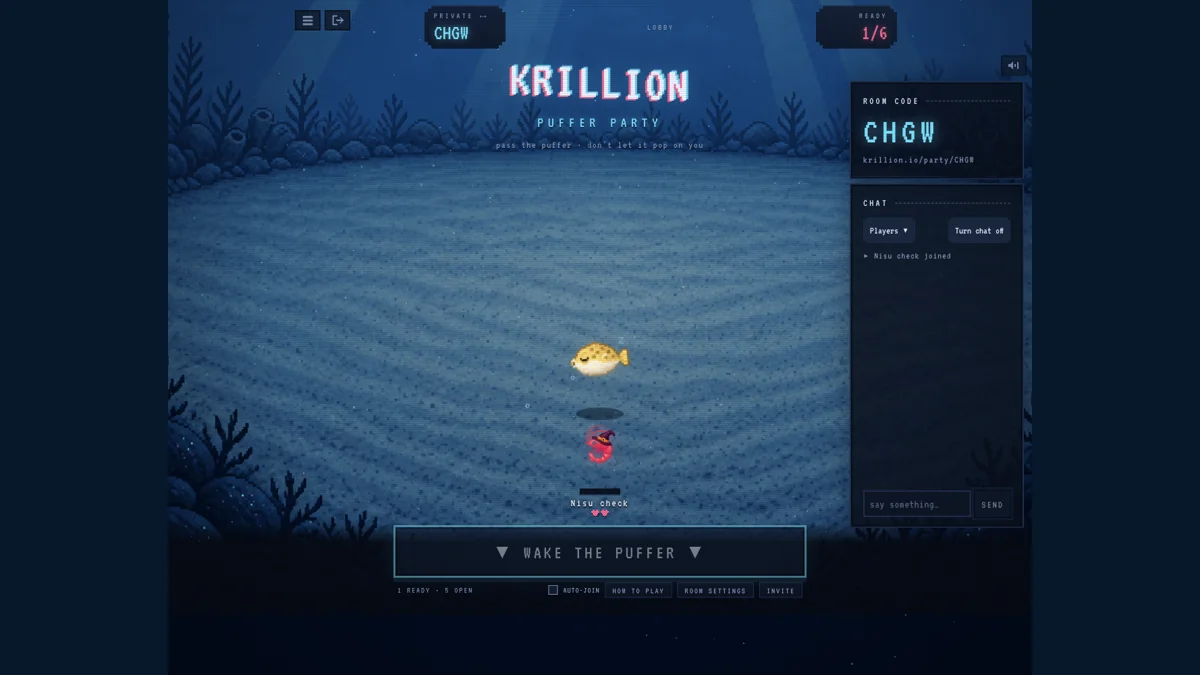
Press Host a Room. Inside, check that the room badge says Private and note its four-letter code. Our fresh room showed one ready player out of six seats. The badge also lets the host change visibility, so check it again before sending an invitation.
Invite friends and join the same room
The room displays its code and a full address in the form krillion.io/party/CODE. Share your room’s actual address with your group, or ask friends to enter the four-letter code in the lobby’s Join by Code field and press Join. The room also has an Invite control.
Each person should open the invitation in their own browser session. Check the room code and Players panel together; seeing the same game title alone does not prove that everyone joined the same room. A second tab in your own browser is not a reliable second-player test.
Use the current room’s invitation. The codes in our screenshots belong to closed test rooms and are not playable invitations. If someone sends a six-digit code from PlayDaily, it belongs to the separate fan version, not this official lobby.
Wait for friends, then start the game
Puffer Party has a Wake the Puffer control in the waiting room. It was disabled with only our single player present, and the room showed “1 ready” with five open seats. If your group is still joining, use that ready count and Players panel to confirm who is actually in the room.
Once the start control is available, agree that everyone is ready before using it. Do not assume the room starts a timed daily quiz automatically: the official room has its own start control and multiplayer rules.
Auto-join is a separate checkbox labelled Auto-join Next Game. Review it if you want a break between games. Our checks covered room setup with one player; we did not complete a match between independent players.
Check lives, turn timing and available seats
Open Room Settings to review the configuration before starting. On a narrow phone screen, the waiting room also displays Lives, Min. Turn and Seats alongside a Rules Edit control. Discuss changes before the game so nobody is surprised by the pace or number of lives.
The values below are what our newly created private room displayed. They describe that setup, not fixed limits for every room. In particular, Min. Turn is the interface’s label; it should not be presented as a guaranteed eight-second answer timer for every turn.
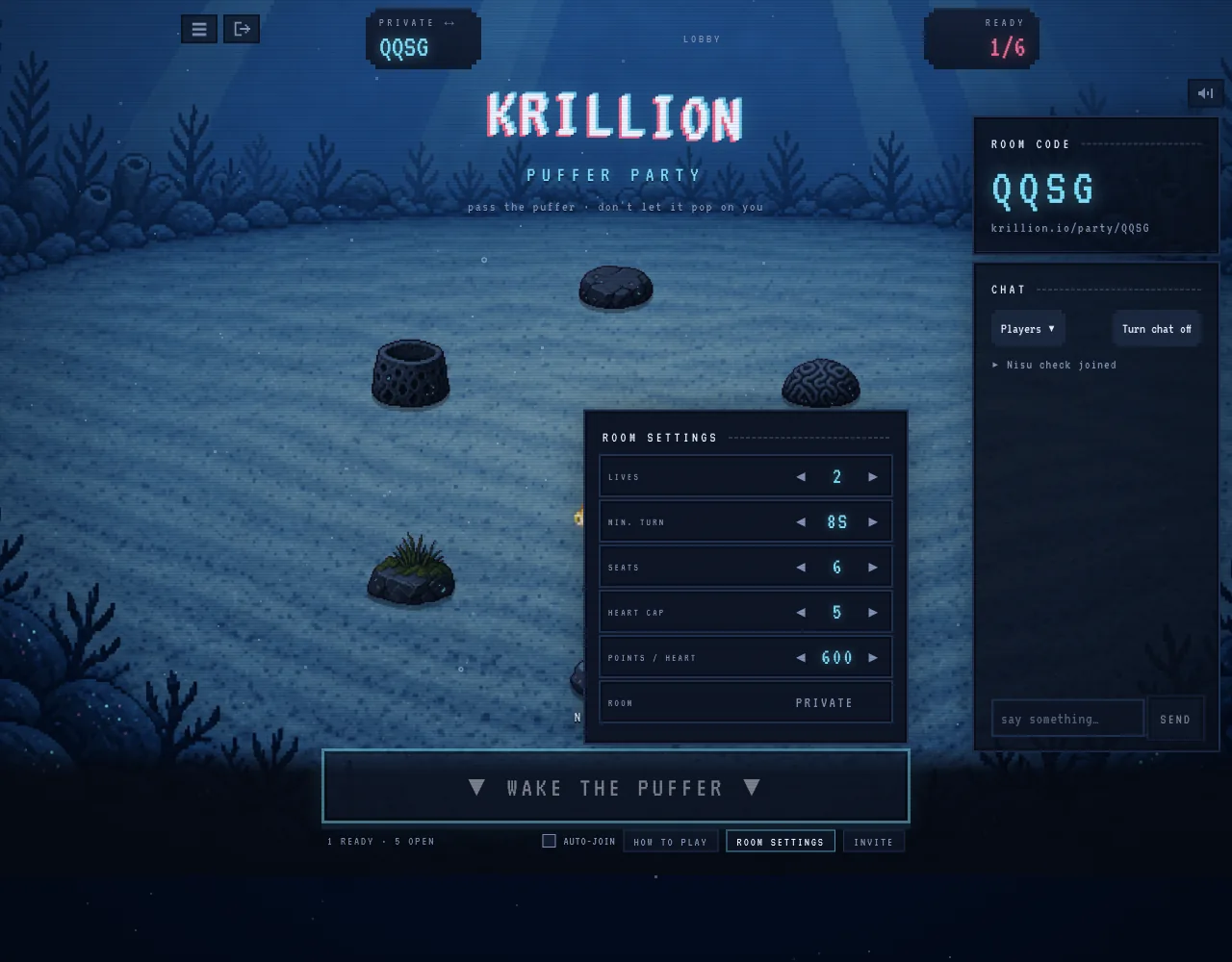
| Setting | Our room displayed | What to check with your group |
|---|---|---|
| Lives | 2 | Starting lives selected for this room. |
| Min. turn | 8s | The configured minimum turn setting. |
| Seats | 6 | Available places in this room; not a tested maximum. |
| Heart cap | 5 | The room’s selected heart cap. |
| Points / heart | 600 | The selected points threshold per heart. |
| Room | Private | Keep this private if only invited friends should join. |
Answer before the puffer explodes
The official How to Play panel gives three central rules: answer the question before the puffer explodes on you, choose rarer answers to work toward another heart, and avoid answers already used for the current question.
That last rule changes how you prepare. A memorized answer is not useful if another player has already used it. Read the current question, follow whose turn it is and keep another valid answer in mind. The answer field in our waiting room said to wait for the puffer; it was not an invitation to answer a daily prompt early.
Rarity helps you build toward an extra heart, but the room’s settings also matter. Do not convert the daily game’s depth score into multiplayer hearts, or assume the two modes share a seven-question, 25-second format. Use the current room’s help and settings.
Use the room on a phone and leave when finished
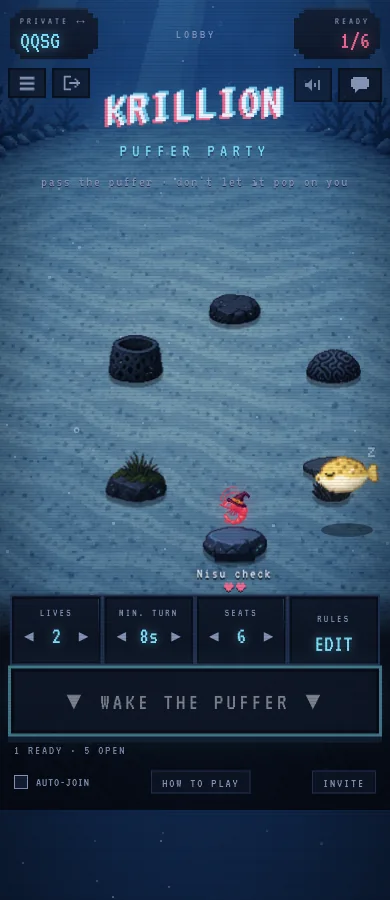
At a phone-sized viewport, the official room kept the code and ready count at the top, with sound and chat controls nearby. The start button, Auto-join and Invite remained below the play area. Check these controls before the game begins so you can return to the question quickly.
Use the room’s exit control, labelled Leave Room, when you are finished. When our only player left, the page reported that the room had closed and offered Back to the Rooms. If your group has all left, check that a room still exists before reusing its old invitation.
The screenshot shows a narrow browser viewport. It confirms the layout we inspected, not a completed mobile match or keyboard test on every phone.
Fix a room code or start button that does not work
First compare the exact address and code with the host. Official Puffer Party uses a four-letter code and a krillion.io/party room address. A code from another Krillion version will not identify the same room.
If the page says the room closed, return to the lobby and ask the host for a current invitation. If the ready count has reached the configured seat count, ask the host to check Seats before you keep retrying. We did not test a full room, so a seat setting is not a promise about maximum supported capacity.
If Wake the Puffer is dimmed, check whether anyone else has joined: it was unavailable in our one-player room. If the entire lobby seems blank or incomplete, allow it to finish loading first; the official lobby took several seconds to appear during our visit.
Official Puffer Party, Friends or PlayDaily?
Use the address and the controls to identify the version. Advice about PlayDaily’s prompt count, automatic dives or six-digit private codes should not be applied to official Puffer Party.
Private rooms and a way to wait for friends were also requests in u/playdailyorg’s Reddit announcement for the fan version. That thread helps explain what players want to do together; it does not document the official game’s settings.
| Entry | Purpose | Where this guide sends you |
|---|---|---|
| Official Puffer Party | Live multiplayer rooms on krillion.io | Use the host, join and room instructions above. |
| Official daily dive / Friends | Daily play and comparing daily results | Use the daily rules guide for scoring. |
| PlayDaily fan version | A separate unofficial room game | Follow that host’s own invitation and controls. |
| Nisu daily hints | Lookup and progressive hints for today’s original daily list | Use the companion below for daily preparation, not live-room answers. |
Use Nisu’s existing tool for the daily puzzle
For the original daily dive, Nisu’s Krillion companion lets you look up an answer and reveal progressively stronger hints for the current prompts. It is useful before a daily attempt or when reviewing a result afterwards.
The tool does not read your Puffer Party room, provide its live questions, track used answers or host a match. A daily answer list cannot tell you whether an answer has already been used in a multiplayer room. Keep it for daily play; use the room’s own question and feedback during Puffer Party.
Quick help
Where do I play official Krillion multiplayer?
Open Puffer Party at krillion.io/party. It has Quick Play, Host a Room and Join by Code. The older FAQ’s planned-multiplayer wording does not match the live lobby checked on October 20, 2026.
How do I make a private Krillion multiplayer room?
Enter a nickname, change Public · Listed to Private · Code Only, then select Host a Room. Confirm the room badge says Private and share its room link or four-letter code.
Why will a six-digit code not join Puffer Party?
The official room we checked used a four-letter code. PlayDaily’s fan version uses a different room flow and six-digit private codes. Ask the host for the full invitation URL to identify the right site.
Why is Wake the Puffer disabled?
It was disabled with only one player in our private room. Check the ready count and ask friends to confirm they joined the same room. We did not test every condition that can disable the start control.
How many players can join Krillion multiplayer?
Our fresh official private room had six seats, and Seats was a configurable setting. Six is the observed setup, not a verified maximum; check the current room configuration.
Can I reuse another player’s answer?
The official Puffer Party help says answers cannot be reused for the current question. Keep another answer in mind instead of relying on one memorized choice.
Can Nisu solve my Puffer Party room?
No. Nisu’s existing Krillion tool covers the original daily puzzle with answer lookup and progressive hints. It does not read multiplayer rooms or their used answers.
Does creating a private room require sign-in?
We created and left an official private room without completing an account sign-in. This check does not establish how account features or saved progress work across devices.
Source and scope
Checked October 20, 2026. Nisu created private rooms on official Krillion, inspected How to Play and room settings at desktop and phone widths, confirmed the one-player start control was disabled, and left the room. Screenshots show our own waiting rooms. We did not play a match between independent players or test capacity limits. PlayDaily is a separate fan project; its community thread is not evidence for official Puffer Party rules.